Scene organization guide
How Construct scenes are structured with node types and hierarchies
Last Updated: 2026-10-18
This guide explains how Construct scenes are organized and how different node types work together to create complex 3D shapes.
Node Types
Construct uses a hierarchical scene graph where each node has a specific role:
Primitives
Primitives are the basic building blocks that generate SDF geometry:
- Sphere, Box, Torus - Basic shapes
- Cylinder, Cone, Capsule - Extended shapes
- Rounded Box, Ellipsoid, Octahedron - Specialized shapes
- Plane - Infinite ground plane
Each primitive has parameters (diameter, dimensions, etc.) that control its shape.
CSG Operators
CSG (Constructive Solid Geometry) operators combine multiple shapes:
| Operator | Effect |
|---|---|
| Union | Combines shapes (add) |
| Subtract | Removes second shape from first (carve) |
| Intersect | Keeps only overlapping parts |
| Union smooth | Combines with rounded blend |
| Subtract smooth | Removes with rounded blend |
| Intersect smooth | Intersects with rounded blend |
| Union chamfer | Combines with a beveled seam |
| Subtract chamfer | Removes with a beveled seam |
| Intersect chamfer | Intersects with a beveled seam |
CSG operators accept two or more children.
Transform Operators
Transform operators modify position before evaluating children:
| Operator | Effect | Inverse |
|---|---|---|
| Translate offset | Move by a vector | Yes |
| Translate axis | Move a distance along a direction | Yes |
| Rotate euler | Rotate by Euler angles about a pivot (the origin by default), composed Z, then Y, then X | Yes |
| Rotate euler XYZ / XZY / YXZ / YZX / ZXY | The same angles composed in another order. An item's rotation mode picks which of the six the scene compiles to | Yes |
| Rotate axis | Rotate by an angle about an axis through a pivot | Yes |
| Rotate quaternion | Rotate by a unit quaternion (vector and scalar parts) about a pivot; edited with the Arcball | Yes |
| Scale uniform | Uniform scaling about a pivot | Yes |
| Scale per-axis | Per-axis scaling about a pivot (not an exact distance field) | Yes |
| Mirror axes | Reflect across one or more axes | Yes, to the original copy |
| Repeat linear | Copy along a line | Yes, to the original copy |
| Repeat radial | Copy around an axis | Yes, to the original copy |
| Repeat grid | Copy in a 2D/3D grid | Yes, to the original copy |
Transform operators typically accept one child.
The Inverse column says whether the operator ships the function that maps a point back out to the scene. Construct uses it to place a mesh, a camera or another non-SDF child under the operator (see Children without a slot). A repeat or a mirror maps back to the copy it does not move. Bend, domain warp and sweep ship none, and Construct solves those numerically. To write an inverse for your own operator, see Write a transform operator.
Distance Modifiers
Distance modifiers adjust the SDF distance after evaluating children:
| Modifier | Effect |
|---|---|
| Round | Add rounded edges |
| Onion | Create hollow shell |
| Elongate | Stretch geometry |
Meta items: bounding volumes
Alongside the SDF nodes above, a scene can hold bounding volumes — boxes that frame regions for measurement, cutaway inspection, and export. A volume is a first-class item: named, parametric (center, size and rotation can hold expressions), and it carries independent visible / cutaway / active / locked flags. It contributes no geometry — it never appears in a render or a mesh except as the region boundary.
Parenting sets scope. A volume at the scene root frames the scene; a volume parented under an item follows that item's transform and its fit actions default to that subtree. Moving the parent moves the box. At most one volume per scene is active — the one the cutaway follows and the one an export uses when no volume is named explicitly.
Null objects
A null object is a point in space with no geometry. It shows in the viewport as a small cross of three axis lines, in the axis colors, that keeps its size on the screen. It never appears in a render, an export or a mesh, and "fit to scene" does not count it.
What a null is for is holding other items. Any item can be its child: an SDF shape, a camera, a mesh, a group or another null. Its children move, turn and scale with it. That makes it the joint of a rig: a turntable is a null where the camera looks, the camera as its child, and a rotation of the null driven by an expression (see Make a turntable video).
A null is a group without the group features. It has no Isolated switch, so it is never an SDF domain; Ungroup does not take it apart; and its gizmo always stands on its own origin, where its cross is, not at the middle of its children. Click its cross to select it, or its row in the scene tree.
Scene Hierarchy
Tree Structure
A Construct scene is a tree of nodes:
smooth_union (CSG)
├── sphere_1 (Primitive)
└── translate (Transform)
    └── box_1 (Primitive)
In this example:
- The root is a
smooth_unionoperator - It combines a sphere with a translated box
- The translate only affects the box, not the sphere
Multiple Children
CSG operators can have any number of children:
union (CSG)
├── sphere_1
├── sphere_2
├── sphere_3
└── box_1
All children are combined with the same operation.
Deep Nesting
Transforms can wrap other transforms or operators:
linear_repeat (Transform)
└── rotate (Transform)
    └── smooth_union (CSG)
        ├── sphere_1
        └── torus_1
This creates repeated copies of a rotated blended shape.
Children without a slot
Any node can hold any other node. A child slot — the children of an
operator — only decides whether the parent acts on the child:
| Parent | What a child inherits | Is it combined? |
|---|---|---|
| CSG operator (union, subtract, …) | The operator's transform | Yes, by the operator |
| Transform operator | The operator's transform | It is the operand |
| Primitive (sphere, box, …) | The primitive's translate, rotate and uniform scale | Joined with the parent as a plain union, never cut or blended |
| Group | The group's translate, rotate and uniform scale | No: each child joins wherever the group itself sits |
| Null object | The null's translate, rotate and uniform scale | No, as under a group |
A primitive and its children count as one shape where the primitive sits. If that primitive is the first operand of a subtraction, its children are part of what is subtracted from, not part of what is cut away.
SDF shapes take a uniform scale only, so a child follows its parent's x scale.
A child that is not an SDF shape inherits less:
| Child | Parent | What the child inherits |
|---|---|---|
| Mesh, tet volume, camera, bounding volume, reference image | SDF item (primitive or operator) | Position and rotation, through every operator above it. Never scale |
| Mesh, tet volume, camera, bounding volume, reference image | Group or null object | Position and rotation. Never scale |
A transform that an expression drives works the same way: when a group or a null turns with the frame, its children turn with it, in the viewport and in a rendered animation.
Such a child keeps its own size. If Construct cannot place it exactly, its row in the scene tree shows a warning marker (it follows by a slower path) or an error marker (it stays where it was), with the reason in the tooltip.
Working with the Tree View
The tree view is the scene tree over the viewport. Scene Tree Overlay describes it in full.
Adding Nodes
- Move the mouse into the gap between two rows, and use a button on the tag at the end of the line that appears. The new node goes where the line is.
- Or right-click a row. Add before… adds a node at that row's place. Add child… adds a node under it, on any SDF node, group or SDF domain.
Reparenting
Drag nodes to change their parent. This is useful for:
- Moving a primitive into a CSG operator
- Wrapping geometry with a transform
To put a node under a new operator in one step, right-click it and choose Wrap in….
Selecting, Hiding and Deleting Nodes
- Click a row to select its node. Ctrl-click adds a node to the selection, and Shift-click selects a range.
- Click a node's icon, or press Space, to hide the node or show it again. A hidden node stays in the tree.
- Select a node and press Delete. Children are also removed.
Ask OPAL to Do It
The assistant reaches the same operations through its tasks:
| To | Task |
|---|---|
| select nodes, so that you can see which ones it means | construct.scene.set_selection |
| read what is selected | construct.scene.get_selection |
| put the selected nodes in a new group, as one undo step | construct.scene.group_selection |
| dissolve a group into its parent, as one undo step | construct.scene.ungroup |
| hide or show a node | construct.item.set_tags with the tag hidden |
read a node, with its place in the scene (world) and, for a non-SDF child, whether it could be placed (leaf) |
construct.scene.get_item |
See Construct selection and grouping tasks.
Where an imported item came from
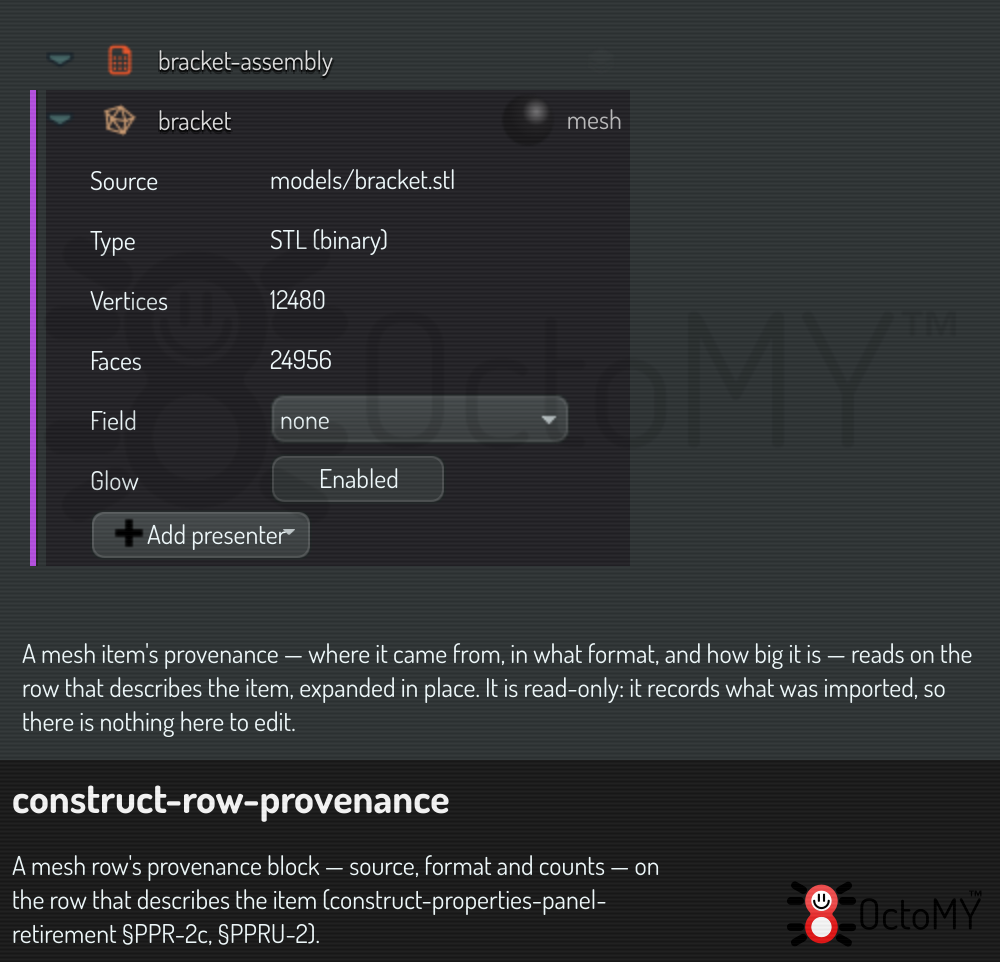
Expanding a mesh or tet-volume row shows its provenance as fact rows: for a mesh, its Source file, its Type, and its Vertices and Faces; for a tet volume, its Source file, its Elements, and for a volume that a bake made, the bake's Resolution. It reads on the row that describes the item rather than in a separate panel, and it is read-only: it records where the item came from, so there is nothing there to edit.
Best Practices
Start Simple
Begin with a single primitive and gradually add complexity:
- Add a base shape
- Add CSG operations to refine
- Add transforms to position and repeat
Use Smooth Operations
Smooth CSG operations (smooth_union, smooth_subtract) create more organic results than their hard-edged equivalents.
Group with Operators
Use CSG operators to logically group related geometry. This makes the scene easier to understand and modify.
Transform at the Right Level
Apply transforms at the appropriate level:
- Transform a primitive: affects only that shape
- Transform a CSG operator: affects the entire group
Related Documentation
- Interface Guide - UI panels and navigation
- Material System - Applying materials to shapes