Write a transform operator
A transform operator changes where its children are drawn: it moves, turns, stretches, bends or copies them. This page shows how to write one in GLSL, with the two companion functions that make it fit into the rest of Construct.
You write it in the definition editor. Open the editor with the toolbar button Toggle primitives editor panel, or choose Edit on a definition in the picker. OPAL can write one for you too, with construct.definition.add.
The operator function
A transform operator is one GLSL function whose name starts with op_ and which returns a vec3:
// Moves its child by an offset.
vec3 op_translate(vec3 p, vec3 offset)
{
	return p - offset;
}
The renderer asks the function a question for every point it draws: a point of the scene is here, so where is it in the child's own space? The function gets the scene point p and returns the point the child sees. That is why a translate by offset subtracts it: the child's origin is drawn at offset.
Construct reads the function's name prefix and signature to know what kind of definition it is. A vec3 op_<id>(vec3 p, …) is a transform operator. The parameters after p become the operator's parameters in the scene tree, in the same order.
Helper functions can sit beside it.
The parameter slots
Every node in the scene carries its parameters in 8 slots. A float or an int takes one slot, a vec2 two, a vec3 three and a vec4 four. A definition whose parameters need more than 8 slots is refused when it loads.
Give each parameter a default, a range and a description in the definition's parameter list. Construct uses the range to check the inverse (see How Construct checks an inverse), so declare one wherever a parameter has a sensible range.
The distance companion
An operator that stretches space changes the units of the child's distance. A scale by 2 makes every distance the child reports half as long as it is in the scene. Such an operator ships a second function that turns the child's distance back into scene units:
float op_<id>_dist(float d, vec3 p, <the same parameters>)
It takes the child's distance d and the scene point p, with the operator's parameters in the same order and of the same types. An operator that only moves or turns its children, like a translate or a rotate, needs none.
The inverse
The inverse answers the opposite question: a point of the child's space is here, so where is it in the scene? Construct uses it to place a mesh, a camera, a bounding volume or another non-SDF child on your operator's shape, so that the child follows its parent's position and rotation.
vec3 op_<id>_inv(vec3 p, <the same parameters>)
The name is the operator's name with _inv added. If the operator's name ends in _pos, drop that first: op_scale_pos pairs with op_scale_inv. The parameters are the operator's, in the same order and of the same types.
The inverse of the translate above:
vec3 op_translate_inv(vec3 p, vec3 offset)
{
	return p + offset;
}
The contract. For every point p that your operator can return, and for every parameter value in range, op(inv(p)) must give back p. The renderer never calls the inverse. It is compiled with the definition, so a syntax error in it fails the definition when it loads.
The inverse is optional. Without one, Construct finds the scene point with a numeric solve. That is slower, and it can fail where your operator folds space.
Operators that copy: return the original
A repeat, a mirror or a fold sends many scene points to one point of the child, because it draws the child many times. Every copy satisfies the contract, so you choose which one the inverse returns. Return the original copy: the one the operator does not move, when there is one. That is what every built-in repeat and mirror does, so a child placed on a repeated shape sits on the original, not on a copy at the far end.
How Construct checks an inverse
An inverse is code that a person writes, so Construct never trusts it. It checks every inverse twice:
- When the definition loads or changes. Construct picks parameter values (the defaults, then values across each declared range), picks points your operator can return, and checks the contract at each. A parameter with no declared range is sampled within 1 000 of its default, and the editor says so.
- Every time it is used. When Construct places a child, it runs the operator on the inverse's answer and checks that it gets the child's point back, at your actual parameter values.
The definition editor shows the verdict under the code: Inverse: being checked, Inverse: verified, or Inverse: rejected. construct.scene.list_definitions reports the same verdict to OPAL.
When an inverse is rejected
A rejected inverse is not used again in that session. Construct places the children by the numeric solve instead, so they still follow the parent. It also tells you, in several places:
-
The definition editor shows Inverse: rejected, and no longer used, with the parameter values, the point and how far off the inverse was.
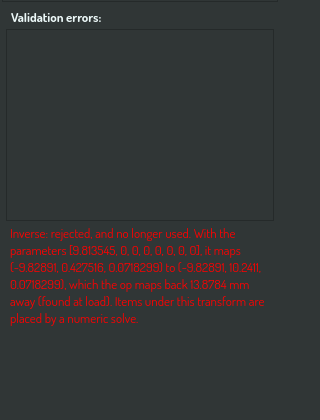
The definition editor's validation card with a rejected inverse -
A notification names the definition, and stays until you acknowledge it.
-
Each mesh or other non-SDF child that the rejected inverse would have placed shows a warning marker in the scene tree. Its tooltip says that it follows by a slower path, and which inverse was rejected.
Fix the inverse and save. An edited definition is checked again.
If a child cannot be placed at all, for example because it sits where your operator never sends a point, its row shows an error marker instead, and the child stays where it was.
Related
- Scene organization: the built-in transform operators and which of them ship an inverse.
- Scene Tree Overlay: putting items inside other items.
- Prompt the Construct agent: the definition tasks OPAL uses.