Post-Effect Parameters
Why every post effect presents its parameters the same way
Post-Effect Parameters
Status: Complete Last Updated: 2026-09-22
Every post effect in the Construct viewport presents its parameters the same way. This page explains the pattern, so the controls feel consistent and so you know where a value goes when you change it.
One pattern for every effect
A post effect declares a list of parameters. Each parameter has a name, a type, a default, and optional bounds and a step. The settings window builds its rows from that list. It does not have a hand-written panel per effect.
This has four consequences:
- A tone mapper with no parameters has no rows of its own. The Tone mapping row in the HDR category is all there is.
- A tone mapper with parameters has its own section under HDR, with one row per parameter, in the order the effect declares them.
- The rows of a tone mapper dim while another tone mapper is chosen. They stay editable, so you can set them before you switch.
- Every row uses the same input for its type. A number gets a drag field with the declared bounds and step.
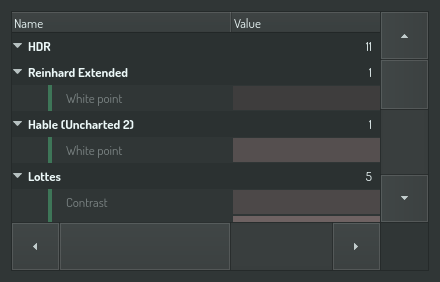
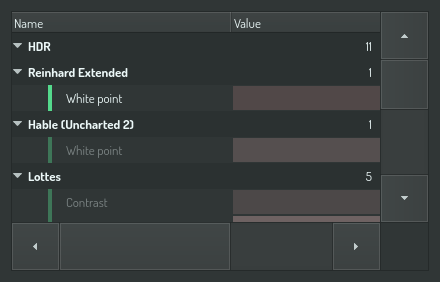
Where the values live
The selected tone mapper and each parameter value are scene settings. They are saved with the document and follow the settings cascade: the application seed supplies a default for new scenes, the scene stores its own value, and a camera can override the scene.
A parameter value is stored under the effect's identity, as
<effect>/<parameter>. Changing the tone mapper does not discard the values
of the previous one. Switch back and its parameters are as you left them.
Resetting a value
Each parameter row carries a reset control that returns the value to the effect's declared default. Resetting one parameter does not touch the others.
Effects other than tone mappers
Bloom and exposure use the same declaration. Their rows appear in the same HDR group, above the tone-mapper selector, and follow the same storage rule.