Control Connection Gating
Control what traffic flows between nodes
Control Connection Gating
Connection gating lets you control what network traffic flows between your nodes. Three independent controls gate three types of outgoing traffic.
Key Concept
The Connect button controls data flow (courier traffic and session re-establishment). The Honeymoon button controls discovery (finding peers on the network). These are independent — you can discover without sending data, or send data without discovering.
Controls
Connect button (wantReachable)
When ON, the node:
- Sends and receives courier data (flood, ping, echo, sensors, agent state, etc.)
- Sends idle keepalive packets to maintain sessions
- Automatically re-handshakes with known trusted peers when a session breaks
- Reacquires trusted peers automatically. If you trust a peer but have lost track of its current network address (a common case — addresses change with the network, e.g. after DHCP), pressing Connect runs a short, quiet reconnect burst to find your trusted peers again, then goes silent once they are all connected. You no longer need to open the pairing screen just to reconnect to peers you already trust.
When OFF, all courier data is silently dropped (both sending and receiving). Sessions are not maintained, and the reconnect burst does not run — the node is quiet.
The reconnect burst is bounded: it stops the moment every trusted peer has a session, and gives up after a short cap if a peer never answers (it does not keep broadcasting for an absent peer). It is distinct from the Honeymoon button below: Connect only looks for peers you already trust; Honeymoon finds all peers, including new ones.
Honeymoon button (wantDiscovery)
When ON, the node:
- Broadcasts discovery packets to find all peers on the network (both new and previously known)
- Runs the honeymoon scheduler at elevated aggressiveness
When OFF, no discovery broadcasts are sent. The node is "quiet" on the network.
Channel toggles (per-carrier)
Per-transport controls (Network/UDP, Bluetooth, Audio, etc.) that gate all traffic on that carrier. When a channel is OFF, no packets of any type are sent or received on that transport.
Always allowed
Regardless of the Connect and Honeymoon settings, the node will always:
- Respond to incoming handshakes — if another node finds us, we reply. This is passive behavior that allows peers to re-establish connections even when we are not actively seeking them.
State combinations
| Connect | Honeymoon | Behavior |
|---|---|---|
| OFF | OFF | Silent. No outgoing traffic of any kind. The node is invisible on the network (but will still respond if someone finds it). |
| OFF | ON | Discovery only. Broadcasts to find peers (new and old), but sends no data and does not initiate session handshakes. Useful for scanning the network without committing to communication. |
| ON | OFF | Data only. Courier data flows to established sessions. Broken sessions are automatically re-established with known trusted peers. No discovery broadcasts. Good for steady-state operation after initial pairing. |
| ON | ON | Full operation. Data flows, broken sessions are repaired, and the node actively discovers peers. This is the normal operating mode during initial setup or when adding new nodes. |
Pro Tip
For normal operation after pairing is complete, Connect ON + Honeymoon OFF is the most efficient mode. Discovery broadcasts are only needed when adding new nodes to your network.
Reading the throughput graph
The Connection screen plots what the two controls above are actually doing, so you can see the reconnect burst rather than take it on trust.
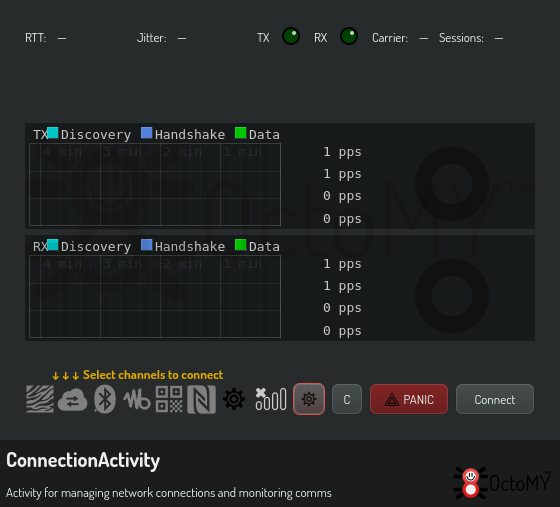
The graph scrolls at one pixel per second, so a column is a second of wall clock and the width of a burst is its duration read directly off the screen. Each column is drawn as a candle spanning the highest and lowest rate seen inside that second, not a single average — a burst that comes and goes between samples still leaves a mark. The three bands are Discovery, Handshake and Data.
What healthy behaviour looks like:
- Press Connect with trusted peers offline and you should see a brief Discovery bump, Handshake activity as each peer answers, then Discovery falling back to nothing while Data continues. That drop back to flat is the burst quiescing — it is the thing to look for.
- At rest, with everything connected, Discovery should be flat. A Discovery band that never settles means something is still hunting for a peer that is not answering.
- Honeymoon ON keeps Discovery busy for as long as it is on, by design. That is the difference between the two controls, visible as a shape.
How it works
Courier data gating
When the Connect button is OFF, CommsChannel::rescheduleSending() skips all courier scheduling. Incoming courier data is silently dropped at the packet processing level. Handshake responses (SYN/ACK) are still processed to allow passive session establishment.
Discovery gating
The Honeymoon button controls wantDiscovery in ReachableState. When OFF, DiscoveryClient and LANDiscovery suppress all broadcast activity. The honeymoon scheduler in Comms is not triggered.
Channel gating
Each CommsCarrier (e.g., CommsCarrierUDP) checks its enabled state before sending or processing any packets. Disabling a channel immediately stops all traffic on that transport.
Troubleshooting
Nodes can't find each other : Make sure the Honeymoon button is ON on at least one of the nodes. Discovery requires active broadcasting.
Data isn't flowing despite being connected : Check that the Connect button is ON. Also verify that the channel toggle for the transport you're using (usually Network/UDP) is enabled.
Sessions keep breaking : This is normal if the Connect button is OFF. When Connect is ON, broken sessions with known trusted peers are automatically re-established via the honeymoon scheduler.