Set Bahn's audio buffer size
Choose the buffer size, or let auto-detect find the smallest clean one
Set Bahn's audio buffer size
Bahn renders sound in blocks. The buffer size is the number of samples in one block. A small buffer plays a note sooner after you type it, and asks more of your machine: if the machine cannot fill a block in time, you hear a click or a gap, which is an underrun. This page shows how to choose the size, and how to let Bahn find it for you.
Open the settings window
Click the Settings button on the toolbar, or press Ctrl+,. The settings
window opens beside Bahn and stays open while you play, so you hear each change
at once. Every change is saved, and Undo takes it back.
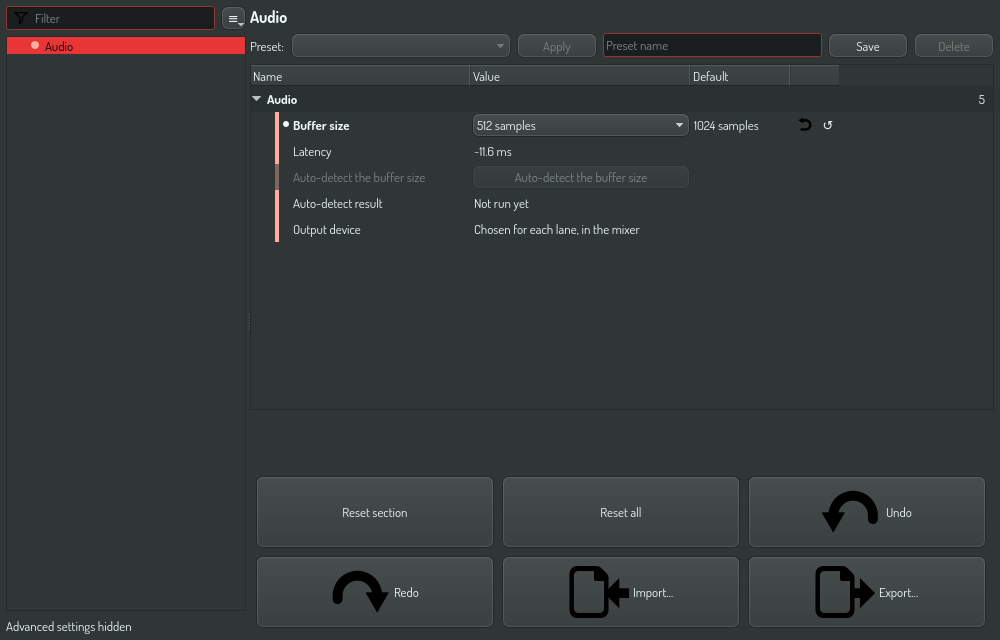
| Row | What it does |
|---|---|
| Buffer size | The samples in one block, from 64 to 8 192 |
| Latency | The delay one block adds, for example ~23.2 ms |
| Auto-detect the buffer size | Finds the smallest size that plays with no underrun |
| Auto-detect result | The size auto-detect tests now, or the size it chose |
| Output device | A reminder that each lane of the mixer chooses its own device |
Choose the size yourself
- Open the Buffer size list.
- Select a size. The audio engine restarts at once with the new size, and the Latency row follows.
- Play a pattern. If you hear clicks, select the next larger size.
Let auto-detect choose
- Turn the audio engine on with the audio button on the toolbar. Auto-detect needs a running engine; while the engine is off, the row is dimmed and says so.
- Click Auto-detect the buffer size.
- Let it play. Bahn plays each size for 1.5 seconds, the largest first, and the Auto-detect result row names the size under test.
- When a size underruns, Bahn keeps the size before it, which is the smallest size that played clean. If every size plays clean, it keeps 64.
The result is stored as one change, so Undo puts the old size back.
Where are the input device and the MIDI tab?
The old Configuration window had an audio input with a level meter, and an empty MIDI tab. Bahn has no audio input path, so the input choice did nothing, and the MIDI tab held no setting. Neither is in the settings window.
For the output device, see Send two mixes to two cards: each Output node is a lane of the mixer, and each lane plays on a device of its own.