Send two mixes to two cards
One Output node, one lane, one card
Send two mixes to two cards
Bahn can play one song through several sound cards at once. Each Output node in the node graph is one lane in the mixer, and each lane has a device of its own. Use this to send the drums to a monitor and the lead to headphones, or to feed two rooms from one song.
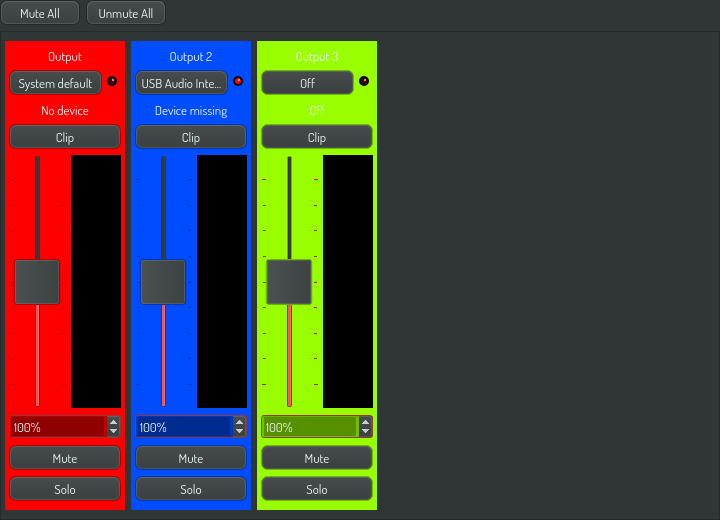
1. One Output node is one lane
- Open the node editor (
F3). - Add a second Output node.
- Open the mixer, the fourth button of the view switch.
There are two lanes now. A new song has one Output node, so it starts with one lane.
2. Give each lane its own card
- Press the lane's Device button. The device list opens.
- Select a card.
- Press OK.
The Device button now shows the card's name. Bahn remembers the choice for this Output node on this machine. A song that you open on another computer plays on that computer's default card until you choose again.
3. Send different instruments to different lanes
Connect each instrument to the Output node of its lane. Each lane carries only what is connected to it, at its own level. A second lane does not make the first one quieter.
4. Check a card before you pick it
In the device list, hold a card's Test button. A tone plays on that card only. Bahn does not need to play for this, so you can find the right card before you start the song. This is the fastest way to tell two identical USB cards apart.
5. When a card is not there
If a lane's card is unplugged, or the song was set up on another machine, the red light beside the Device button comes on and the lane says Device missing. The lane keeps your choice. It never moves to another card by itself. Plug the card in and the lane plays again. The song and the other lanes do not stop.
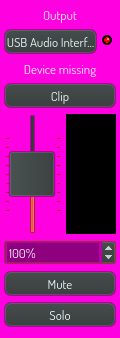
6. Off and System default
The two rows at the top of the device list are not cards:
| Row | What the lane does |
|---|---|
| System default | Plays on the card the operating system uses, and follows it when it changes |
| Off | Opens no card and is silent |
7. Volume, mute, solo and clip
- The fader sets the lane's level. 100% is unity and 200% is double. A pattern that writes the Output node's Volume column overrides the fader for its row.
- Mute silences the lane. Solo silences every other lane.
- Clip lights when the lane reaches full scale, and stays lit until you click it. Each lane has its own card, so one lane can clip while the others do not.
Where did the output setting go?
Bahn's settings window has no output device: each lane chooses its own. The
window sets the buffer size, and its Output device row points here. Open it
with the Settings button on the toolbar, or press Ctrl+,. See
Set Bahn's audio buffer size.
The first time you open a song after the change, its first lane takes the device that the old setting named.