OPAL Design
The Operator Permission and Access Layer
OPAL Design
OPAL (Operator Permission and Access Layer) is the machine-manageable control layer that enables LLMs to interact with agent resources safely.
Did You Know?
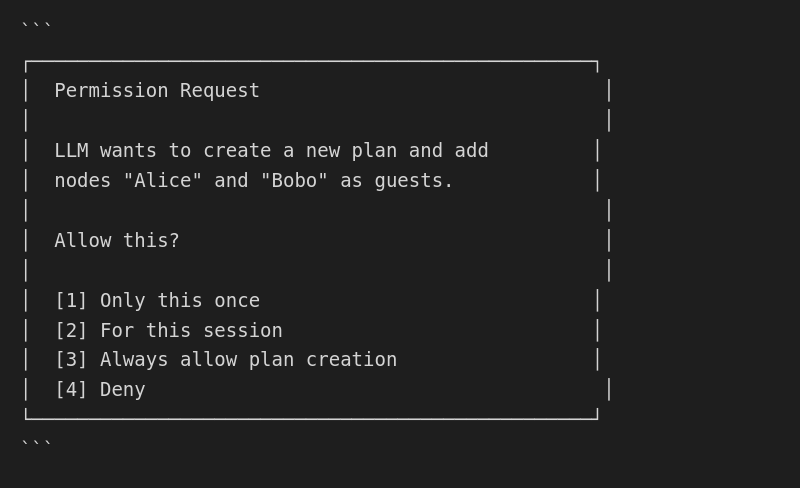
OPAL's permission system is inspired by Android's app permissions, but with richer temporal controls. You can grant an LLM "one-time" access (just this operation), "session" access (until the app closes), or "persistent" access (until explicitly revoked). This gives you fine-grained control over how much autonomy your AI assistant has.
What OPAL provides
| Component | Purpose |
|---|---|
| Command API | Structured JSON interface for all operations |
| Permission System | Granular, user-controlled access grants |
| Self-Documentation | Information queries for LLM discovery |
| Audit Logging | Record of all LLM actions |
Command API
LLMs interact via structured JSON commands rather than free-form text.
Discovery
LLMs can enumerate available commands:
{"command": "enumerate_commands"}

Response:
{
  "commands": [
    "create_plan",
    "list_plans",
    "add_guest",
    "set_target",
    "query_sensors",
    ...
  ]
}
Execution
Commands are issued as JSON objects:
{"command": "create_plan", "title": "Patrol Route A"}

Response:
{
  "result": "success",
  "plan_id": "abc123"
}
Permission denied
When permissions are missing:
{"command": "create_plan", "title": "Patrol Route A"}

Response:
{
  "result": "failed",
  "reason": "Missing permission: plan.create",
  "hint": "Use ask_permission to request access"
}
Self-documentation
Each endpoint describes itself:
{"command": "describe", "target": "create_plan"}

Response:
{
  "description": "Creates a new behavior plan",
  "parameters": {
    "title": "string (required)",
    "template": "string (optional)"
  },
  "permissions": ["plan.create"],
  "examples": [
    {"command": "create_plan", "title": "My Plan"}
  ]
}
Permission model
Inspired by Android's permission system but with richer context.
Permission types
| Type | Scope | Example |
|---|---|---|
| Resource | Per-resource-type | plan.create, node.configure |
| Action | Specific operations | actuator.move, sensor.read |
| Target | Specific nodes | node.alice.control |
Permission prompts
When an LLM requests a new permission:
Temporal scopes
| Scope | Duration | Use Case |
|---|---|---|
| One-time | Single operation | Testing, unusual requests |
| Session | Until app closes | Normal operation |
| Persistent | Until revoked | Trusted operations |
Permission features
- Granular - Fine-grained per-resource permissions
- Temporal - One-time, session, or persistent
- Revocable - Dashboard to review and revoke grants
- Auditable - All grants and uses logged
User consent model
Principles
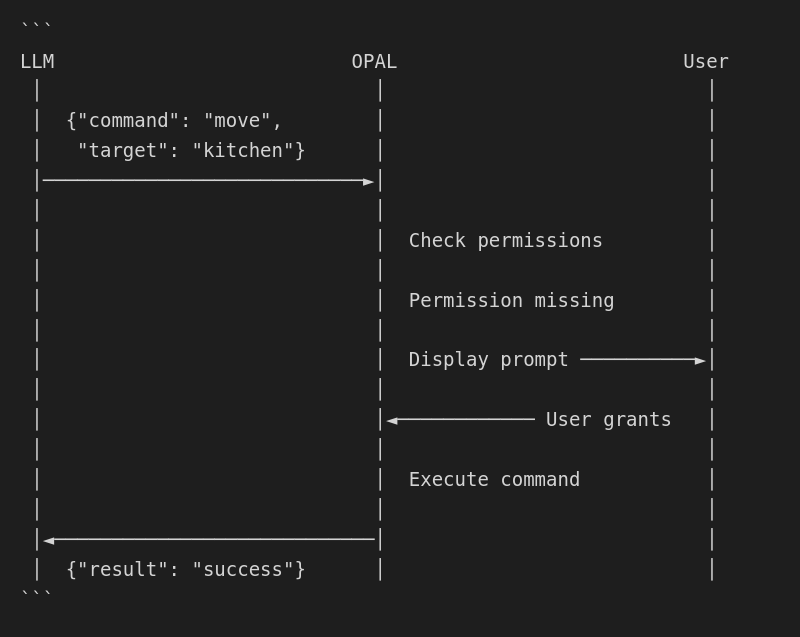
- LLM must request permission before sensitive operations
- User sees human-readable description of intended action
- Clear indication of scope and affected resources
- No silent operations on protected resources
Consent flow
Audit logging
All OPAL interactions are logged:
{
  "timestamp": "2025-01-15T14:32:01Z",
  "command": "set_target",
  "parameters": {"location": "kitchen"},
  "permission_checked": "navigation.set_target",
  "permission_status": "granted",
  "result": "success",
  "resources_affected": ["agent.navigation"]
}
Log contents
| Field | Description |
|---|---|
timestamp |
When the action occurred |
command |
Command issued |
parameters |
Command parameters |
permission_checked |
Permission that was verified |
permission_status |
granted/denied/not_required |
result |
success/failed/error |
resources_affected |
What was modified |
Log access
- Viewable in admin interface
- Exportable for analysis
- Used for debugging and security review
Error handling
Graceful failures
- Clear error messages with actionable hints
- No cascading failures - each command is atomic
- LLM can retry or request missing permissions
Example error responses
Invalid command:
{
  "result": "error",
  "error": "unknown_command",
  "message": "Command 'foobar' not recognized",
  "hint": "Use enumerate_commands to see available commands"
}
Invalid parameters:
{
  "result": "error",
  "error": "invalid_parameters",
  "message": "Parameter 'speed' must be between 0 and 100",
  "received": 150
}
Resource not found:
{
  "result": "error",
  "error": "not_found",
  "message": "Node 'Charlie' not found in address book"
}
Hallucination containment
LLMs can generate plausible but incorrect outputs. OPAL contains this:
- Invalid commands rejected with schema errors
- Unknown resources return clear "not found" errors
- Permission system prevents unauthorized actions regardless of LLM confidence
- Structured JSON prevents injection attacks
Permission categories
Plan permissions
| Permission | Description |
|---|---|
plan.create |
Create new plans |
plan.edit |
Modify existing plans |
plan.delete |
Remove plans |
plan.execute |
Run plans |
plan.share |
Share plans with other nodes |
Navigation permissions
| Permission | Description |
|---|---|
navigation.set_target |
Set navigation destination |
navigation.set_speed |
Adjust movement speed |
navigation.stop |
Emergency stop |
navigation.query |
Read current position |
Sensor permissions
| Permission | Description |
|---|---|
sensor.read |
Read sensor values |
sensor.configure |
Adjust sensor settings |
sensor.stream |
Continuous sensor data |
Node permissions
| Permission | Description |
|---|---|
node.configure |
Change node settings |
node.query |
Read node status |
node.trust |
Modify trust relationships |