Remote Node Reference
Technical reference for the Remote node type
Remote node reference
Technical reference for the Remote node type. A Remote is the user interface for controlling Agents in the OctoMY™ network.
Did You Know?
The Remote is designed as a "thin client" - most of its logic comes from the Node base class, and each Agent connection is managed by a separate AgentClient instance. This makes the codebase simpler and means you can control multiple Agents simultaneously, each with its own connection state.
Overview
| Property | Value |
|---|---|
| Class | Remote (inherits Node) |
| NodeType | TYPE_REMOTE |
| NodeRole | ROLE_CONTROL |
| Default Port | 8125 (UDP) |
| Theme Color | #36bee8 (blue) |
| Library | libremote |
Architecture
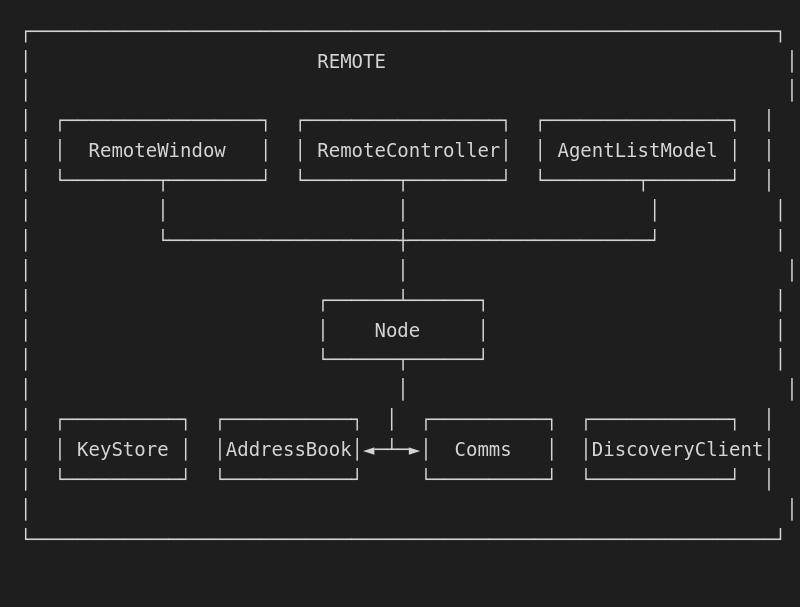
Core components
Remote class
The main Remote class extends Node for control functionality:
class Remote : public Node {
    QSharedPointer<RemoteWindow> mWindow;
    // Node provides: keyStore, addressBook, comms, discovery...
};
The Remote is designed as a "thin client" - most complexity lives in the Node base class and in the AgentClient instances.
Key methods
| Method | Description |
|---|---|
nodeConfigure() |
Initialize Remote-specific setup |
nodeActivate(bool) |
Activate/deactivate the Remote |
nodeWindow() |
Returns the RemoteWindow instance |
nodeRole() |
Returns ROLE_CONTROL |
nodeType() |
Returns TYPE_REMOTE |
registerNodeCouriers(bool) |
Register communication couriers |
Control role
The Remote has the ROLE_CONTROL role in OctoMY communication. This is shared with Hub but differs in purpose:
| Aspect | Remote | Hub |
|---|---|---|
| Focus | Single agent at a time | Multiple agents |
| Hardware | Portable handheld | Stationary server |
| UI | Rich, interactive | Administrative |
| Use case | Direct human control | Automated coordination |
Agent management
AgentListModel
The Remote maintains a list of known Agents:
class AgentListModel : public QAbstractListModel {
    // Provides model for Agent list display
    // Updates from AddressBook
    // Tracks connection status
};
Client connections
For each paired Agent, the Remote creates an AgentClient:
| Component | Purpose |
|---|---|
AgentClient |
Connection to one Agent |
AgentClientWidget |
UI for one Agent connection |
AgentClientCourierSet |
Couriers for Agent communication |
Communication
As Control role
In communication, the Control role means:
- Sends commands to Agents
- Receives sensor data from Agents
- Sends Plan updates to Agents
- Requests state information
Couriers registered
| Courier | Direction | Purpose |
|---|---|---|
| RemoteClientCourierSet | Both | Agent control |
| DiscoveryCourier | Both | Peer discovery |
| BlobCourier | Both | Binary data transfer |
Control modes
The Remote supports multiple levels of control:
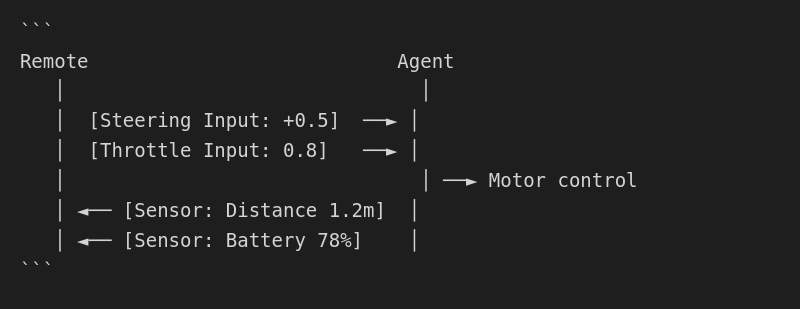
Low-level control
Direct actuator manipulation with real-time feedback:
Mid-level control
Gesture-based commands:
- Move forward
- Turn left/right
- Stop
- Emergency stop (panic)
High-level control
Target-based navigation:
- Go to waypoint
- Follow path
- Execute Plan
UI components
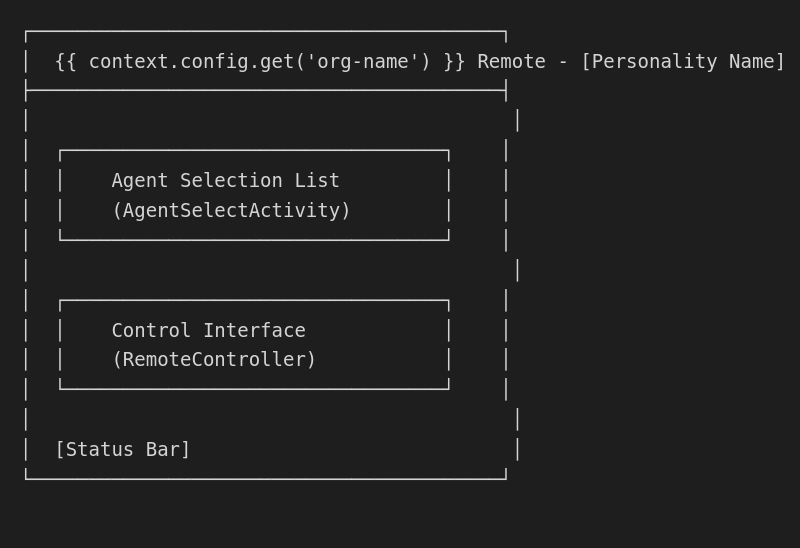
RemoteWindow
The main window for Remote UI:
Activities
| Activity | Purpose |
|---|---|
| AgentSelectActivity | Choose which Agent to control |
| RemoteController | Active control interface |
| ControlDeliveryActivity | First-time setup |
| PairingActivity | Establish trust with Agents |
| ConnectionActivity | Manage Agent connections |
Control widgets
| Widget | Purpose |
|---|---|
| CarSteeringWidget | Virtual steering wheel |
| PanicButton | Emergency stop |
| HUDWidget | Flight instrument display |
| RealtimeValuesWidget | Live sensor readings |
Storage location
~/.local/share/OctoMY™/OctoMY Remote/<personality>/
├── keystore.json       # Cryptographic keys
├── addressbook.json    # Known Agents
└── planbook/           # Stored Plans (optional)
First-time setup
The Remote "birth" process:
- Key Generation - Create cryptographic identity
- Personality Generation - Derive name, colors, identicon
- Agent Discovery - Find nearby Agents
- Pairing - Establish trust with first Agent
- Control Setup - Configure preferred control mode
Command line
# Start Remote with default personality
./remote

# Start with specific personality
./remote --personality "MyController"

# Start with specific base directory
./remote --base-dir /path/to/data

# Enable debug output
./remote --debug
Services
The Remote activates these services in order:
| Level | Service | Purpose |
|---|---|---|
| 1 | KeyStoreService | Cryptographic identity |
| 2 | LocalIdentityStoreService | Node identity |
| 3 | LocalAddressListService | Network addresses |
| 4 | AddressBookService | Known Agents |
| 5 | PlanBookService | Behavior plans (optional) |
| 6 | CarrierService | UDP transport |
| 7 | CommsService | Communication protocol |
| 8 | DiscoveryClientService | Agent discovery |
API reference
Inherited from Node
The Node base class provides these inherited methods:
keyStore()- Access cryptographic keysaddressBook()- Access known Agentscomms()- Access communication systemdiscoveryClient()- Access Agent discoverynodeIdentity()- Get this node's identityclientList()- Get connected clients
Platform support
| Platform | Status | Notes |
|---|---|---|
| Linux (Desktop) | Full | Primary development platform |
| Android | Full | Touch-optimized UI |
| macOS | Partial | Needs testing |
| iOS | Planned | Future support |
| Windows | Partial | Needs testing |