Controller Interface
Hardware controller abstraction
Controller Interface
Reference for the OctoMY™ controller abstraction layer that communicates with robot hardware.
Design Note
OctoMY™ ships with a single hardware controller — Fixo — that compiles your robot's actuator/sensor configuration into purpose-built firmware via embedded LLVM/Clang. The legacy ArduMY/Fluxo runtime-configurable path and the Servotor32 binding were removed in 2026 — Fixo replaces both.
Overview
The controller hardware stack in OctoMY™ is composed as follows:
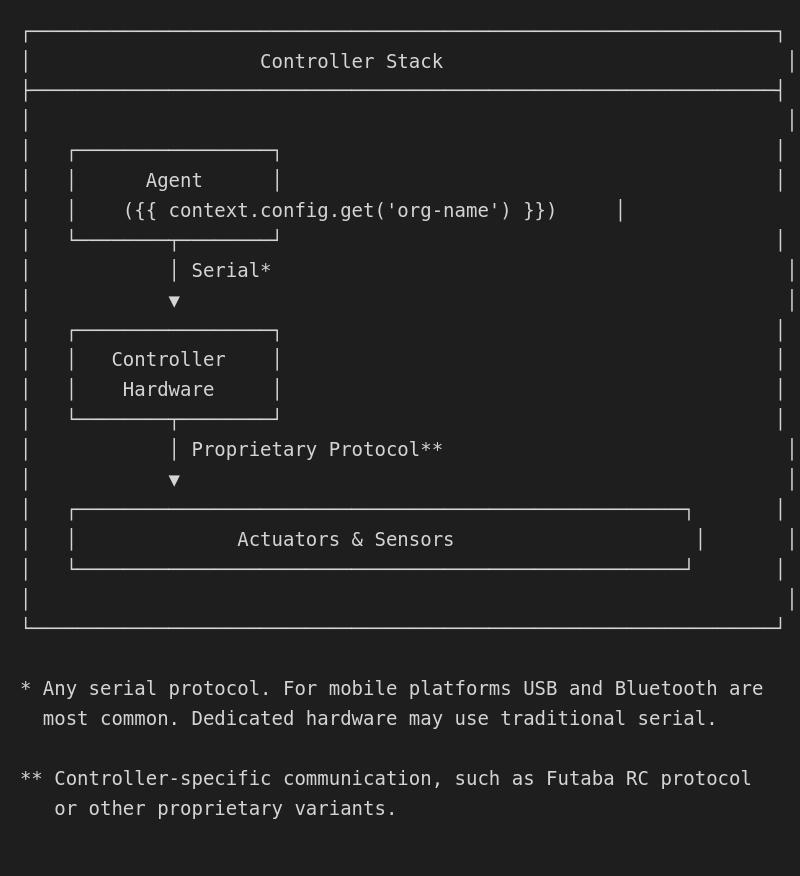
The controller is implemented by the FixoController class in libfixo. Hardware variation (different Arduino boards, different actuators) is handled inside Fixo's firmware-generation pipeline rather than by swapping controller classes.
Controller feature areas
The controller supports the following feature areas:
| Area | Description |
|---|---|
| Actuator Control | Control actuators connected to the controller |
| User Input Control | Accept data from user inputs (mouse, touch, joystick, etc.) |
| Sensor Control | Accept data from sensors connected to the controller |
| Lobe Control | Real-time processing of sensor/input data to generate actuator signals |
The simplest configuration only uses a few actuators with no sensors or lobes. Sensors, lobes, and advanced features are all opt-in via the FixoPreset.
General interface
Controller identification
class FixoController {
public:
    // Identity
    QString controllerTitle() const;
    QString controllerDescription() const;
    QString controllerIcon() const;
    QString controllerVersion();
};
Debug mode
class FixoController {
public:
    bool isDebug();
    void setDebug(bool debug);
};
Configuration widget
class FixoController {
public:
    // UI for configuring this controller
    bool hasConfigurationWidget() const;
    QWidget* configurationWidget();
};
Serial interface
class FixoController {
public:
    bool usesSerial() const;
    void setSerialDevice(QSerialPort& port);
};
Configuration processing
class FixoController {
public:
    // Load/store internal configuration
    QVariantMap configuration();
    void setConfiguration(const QVariantMap& map);

signals:
    void configurationChanged();
};
Connection management
class FixoController {
public:
    void setConnected(bool connected);
    bool isConnected();
};
Controller handle subsystem
The controller handle subsystem adds per-actuator management:
| Feature | Description |
|---|---|
| Enable/Disable | Each actuator can be independently enabled or disabled |
| Limp/Active | Each actuator can be set to limp (unpowered) or active |
| Reverse | Each actuator can have its direction reversed |
| Trim | Each actuator can have low and high trim values set |
| Center | Each actuator can be "centered" to a default position |
Future features
| Feature | Description |
|---|---|
| Pose Targeting | Set a pose as target, making all actuators move in unison |
| Position Recording | Record poses by reading servo positions (requires special servos) |
Controller paradigm
OctoMY™ ships a single controller — Fixo — which compiles the hardware configuration into purpose-built firmware via embedded LLVM/Clang. The resulting binary contains zero runtime overhead — every actuator type, pin number, and sensor is a compile-time constant.
| Feature | Description |
|---|---|
| Configuration | Compiled into firmware at build time |
| Config change | Requires rebuild + reflash (~10 seconds) |
| Runtime overhead | None |
| Best for | Production deployment, resource-constrained MCUs |
See: Fixo Controller Reference
Earlier releases shipped a runtime-configurable ArduMY/Fluxo path, a Servotor32 binding, and an
IControllerabstraction layer. All three were removed in 2026 — Fixo replaces them with a unified compile-then-flash workflow and a single concrete controller class.
User inputs
User inputs are artificial sensor-like values generated from the OctoMY™ user interface.
Example
A GUI presents a car steering wheel and throttle. When the user interacts using touch:
- Steering angle is generated and streamed to controller
- Throttle position is generated and streamed to controller
User input classification
Sample rate
How often is the input sampled? Usually limited by GUI refresh rate and/or input devices.
| Rate | Source |
|---|---|
| 60 Hz | Baseline (standard displays) |
| 240 Hz | High-refresh displays |
| 1000 Hz | High-performance mice |
Latency and stability are limited by UI engine performance.
Sample acquisition
| Type | Description | Example |
|---|---|---|
| Pull | Controller asks for value when needed | On-demand |
| Event | Controller receives value when available | Button press |
| Push | Controller receives steady stream of values | Joystick position |
Configuration sections
Controller section (Plan)
{
  "type": "fixo",
  "preset": "rc-car"
}
| Field | Description |
|---|---|
| Type | Controller type — currently always fixo |
| Preset | Name of the FixoPreset describing actuators, sensors, and lobes |
Actuator reference section
{
  "controller": "main",
  "actuator": "throttle",
  "flags": ["reverse"]
}
| Field | Description |
|---|---|
| Controller | Reference to controller containing the actuator |
| Actuator | The actuator identifier |
| Flags | Active flags: reverse, etc. |
Lobe section
{
  "type": "wheeled",
  "throttle": {"controller": "main", "actuator": "throttle"},
  "steering": {"controller": "main", "actuator": "steering"}
}
| Field | Description |
|---|---|
| Type | Lobe type: tracked, wheeled, hovering, legged |
| Lobe-specific | Remaining fields are lobe-type-specific |
Wheeled lobe
| Field | Description |
|---|---|
| Throttle | Actuator reference for throttle |
| Steering | Actuator reference for steering |
Legged lobe
| Field | Description |
|---|---|
| Hip (Coxa) | Actuator reference for hip joint |
| Thigh (Femur) | Actuator reference for thigh joint |
| Shin (Tibia) | Actuator reference for shin joint |
| Foot (Tarsus) | Optional actuator reference for foot joint |
Puppet and pose
Puppet section
{
  "actuators": [/* puppet actuator list */]
}
Pose section
{
  "puppet": "main_puppet",
  "values": [
    {"id": 0, "mode": "move", "value": 90},
    {"id": 1, "mode": "limp"},
    {"id": 2, "mode": "freeze"}
  ]
}
| Actuator Mode | Description |
|---|---|
| limp | Actuator is unpowered |
| freeze | Actuator holds position |
| train | Record position from servo |
| move | Move to specified value |
Animation section
{
  "poses": [
    {"time_ns": 0, "pose": "start"},
    {"time_ns": 1000000000, "pose": "middle"},
    {"time_ns": 2000000000, "pose": "end"}
  ]
}
Animations are sequences of poses with nanosecond timestamps. Only poses for one puppet are allowed per animation.