Store Keys
Key storage and cryptographic data
Store Keys
Reference for OctoMY™'s key storage system, cryptographic data formats, and identity management.
Security Consideration
The keystore.json file contains your node's private key. Never share this file - losing control of your private key means someone can impersonate your node. Back it up securely, and if compromised, regenerate keys (which will require re-pairing with all peers).
Store architecture
The run-time data of each OctoMY node is kept in a Store. The store is a QVariantMap tree with wrappers to manipulate the data asynchronously.
Core concepts
| Concept | Description |
|---|---|
| Async Access | All store operations are asynchronous for non-blocking UI |
| Auto-persistence | Store automatically loads at startup and persists on changes |
| Generators | Some data items are backed by generators that create values on-demand |
| Multi-file | Persistence can span multiple files while appearing as one store |
| Stackable | Interface can be stacked for caching, muxing, network forwarding |
Store API interface
The basic interface:
// Get data asynchronously
get(Key key, Callback(Status status, Data *data))

// Put data with mode
put(Key key, Data *data, Mode mode)
Where:
- Key - Identifier for the data (XPath-like path)
- Callback - Function called on completion
- Status - Result state (success, not found, error, etc.)
- Data - The actual data, or null
- Mode - How to put the data (create, update, replace, etc.)
Key paths
Keys use an XPath-like syntax to navigate the store tree:
keystore.localkey.pub          # Local public key
keystore.remotekey[CAFEBABE]   # Remote key by ID
personality.name               # Personality name
peers[0].trustLevel            # First peer's trust level
Key store overview
OctoMY™ uses a secure key storage system for cryptographic material:
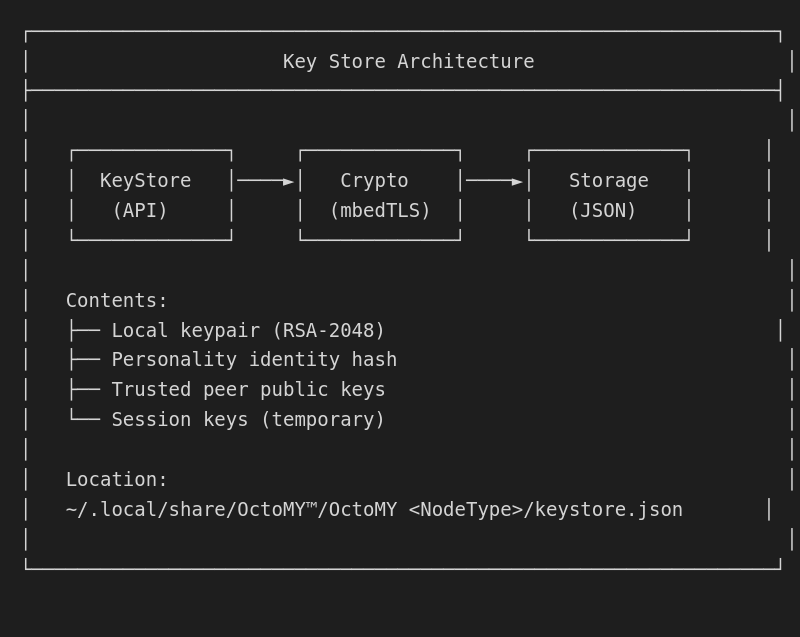
Key types
Local keypair
The node's RSA-2048 keypair for identity and encryption:
| Field | Size | Description |
|---|---|---|
localKey.public |
2048 bits | Public key (shared with peers) |
localKey.private |
2048 bits | Private key (never shared) |
localKey.created |
timestamp | Generation timestamp |
localKey.algorithm |
string | "RSA-2048" |
Personality identity
The node's unique identity derived from the public key:
| Field | Size | Description |
|---|---|---|
personality.id |
64 bytes | SHA-512 hash of public key |
personality.name |
string | Human-readable name |
personality.created |
timestamp | Creation timestamp |
personality.nodeType |
enum | Agent, Remote, Hub |
Peer keys
Public keys of trusted peers:
| Field | Size | Description |
|---|---|---|
peers[].id |
64 bytes | Peer personality ID |
peers[].publicKey |
2048 bits | Peer's public key |
peers[].name |
string | Peer's name |
peers[].trustLevel |
enum | Trust level (0-5) |
peers[].lastSeen |
timestamp | Last successful connection |
Trust levels
Peers are assigned trust levels that determine capabilities:
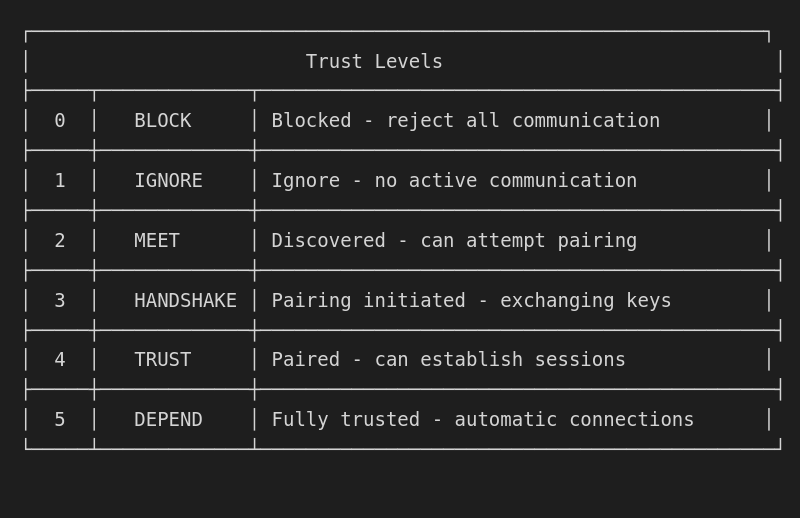
Trust level capabilities
| Level | Discovery | Pairing | Sessions | Control | Plans |
|---|---|---|---|---|---|
| BLOCK | No | No | No | No | No |
| IGNORE | Yes | No | No | No | No |
| MEET | Yes | Initiate | No | No | No |
| HANDSHAKE | Yes | Continue | Pending | No | No |
| TRUST | Yes | Complete | Yes | Limited | No |
| DEPEND | Yes | Complete | Yes | Full | Yes |
Key store format
JSON structure
{
  "version": 1,
  "created": "2024-01-15T10:30:00Z",
  "modified": "2024-01-20T14:45:00Z",
  "localKey": {
    "algorithm": "RSA-2048",
    "publicKey": "-----BEGIN PUBLIC KEY-----\nMIIBIjANBgkq...",
    "privateKey": "-----BEGIN PRIVATE KEY-----\nMIIEvgIBADAN...",
    "created": "2024-01-15T10:30:00Z"
  },
  "personality": {
    "id": "a1b2c3d4e5f6...",
    "name": "MyRobot",
    "nodeType": "Agent",
    "created": "2024-01-15T10:30:00Z"
  },
  "peers": [
    {
      "id": "f6e5d4c3b2a1...",
      "name": "MyRemote",
      "nodeType": "Remote",
      "publicKey": "-----BEGIN PUBLIC KEY-----\nMIIBIjANBgkq...",
      "trustLevel": 5,
      "firstSeen": "2024-01-16T09:00:00Z",
      "lastSeen": "2024-01-20T14:45:00Z",
      "addresses": [
        "192.168.1.100:8125",
        "10.0.0.50:8125"
      ]
    }
  ],
  "sessions": []
}
Key store API
Loading and saving
#include "sec/KeyStore.hpp"

// Create key store
KeyStore store;

// Load from file
if (!store.load("/path/to/keystore.json")) {
    qWarning() << "Failed to load key store";
}

// Save to file
if (!store.save("/path/to/keystore.json")) {
    qWarning() << "Failed to save key store";
}
Local key management
// Check if local key exists
if (!store.hasLocalKey()) {
    // Generate new keypair
    store.generateLocalKey(2048);  // RSA-2048
}

// Get local public key
QByteArray publicKey = store.localPublicKey();

// Get personality ID
QString personalityId = store.personalityId();
Peer management
// Add new peer
Peer peer;
peer.id = "abc123...";
peer.name = "NewPeer";
peer.publicKey = peerPublicKey;
peer.trustLevel = TrustLevel::MEET;
store.addPeer(peer);

// Find peer by ID
Peer* found = store.findPeer("abc123...");
if (found) {
    qDebug() << "Found peer:" << found->name;
}

// Update trust level
store.setTrustLevel("abc123...", TrustLevel::TRUST);

// Remove peer
store.removePeer("abc123...");

// Get all peers
QList<Peer> peers = store.allPeers();

// Get peers by trust level
QList<Peer> trusted = store.peersByTrustLevel(TrustLevel::TRUST);
Key operations
// Sign data
QByteArray signature = store.sign(data);

// Verify signature
bool valid = store.verify(data, signature, peerPublicKey);

// Encrypt for peer
QByteArray encrypted = store.encryptForPeer("abc123...", plaintext);

// Decrypt from peer
QByteArray decrypted = store.decryptFromPeer("abc123...", ciphertext);
Address book integration
The key store integrates with the AddressBook for peer management:
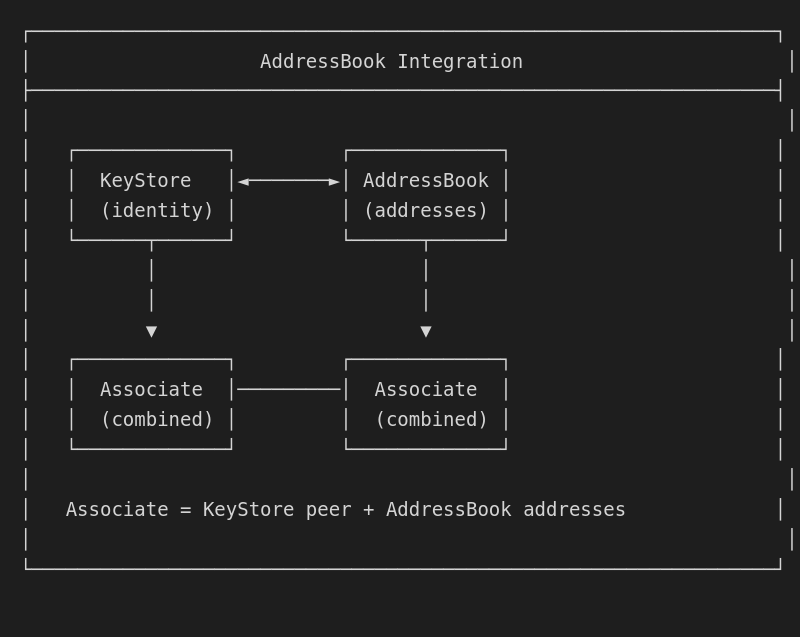
Associate structure
class Associate {
public:
    // Identity (from KeyStore)
    QString id() const;            // Personality ID
    QString name() const;          // Display name
    NodeType nodeType() const;     // Agent/Remote/Hub
    QByteArray publicKey() const;  // RSA public key
    TrustLevel trustLevel() const; // Trust level

    // Addresses (from AddressBook)
    QList<CarrierAddress> addresses() const;
    CarrierAddress bestAddress() const;

    // Connection state
    bool isConnected() const;
    quint64 lastSeen() const;
};
Key store keys reference
Root keys
| Key | Type | Required | Description |
|---|---|---|---|
version |
int | Yes | Store format version |
created |
ISO8601 | Yes | Store creation time |
modified |
ISO8601 | Yes | Last modification time |
localKey |
object | Yes | Local keypair |
personality |
object | Yes | Node identity |
peers |
array | No | Trusted peers |
sessions |
array | No | Active session keys |
localKey object
| Key | Type | Required | Description |
|---|---|---|---|
algorithm |
string | Yes | "RSA-2048" |
publicKey |
PEM | Yes | PEM-encoded public key |
privateKey |
PEM | Yes | PEM-encoded private key |
created |
ISO8601 | Yes | Key generation time |
personality object
| Key | Type | Required | Description |
|---|---|---|---|
id |
hex | Yes | 64-byte SHA-512 hash |
name |
string | Yes | Display name |
nodeType |
enum | Yes | Agent, Remote, Hub |
created |
ISO8601 | Yes | Creation time |
peers array item
| Key | Type | Required | Description |
|---|---|---|---|
id |
hex | Yes | Peer personality ID |
name |
string | Yes | Peer display name |
nodeType |
enum | Yes | Peer node type |
publicKey |
PEM | Yes | Peer public key |
trustLevel |
int | Yes | 0-5 trust level |
firstSeen |
ISO8601 | Yes | First encounter |
lastSeen |
ISO8601 | Yes | Last successful contact |
addresses |
array | No | Known addresses |
notes |
string | No | User notes |
Security considerations
Private key protection
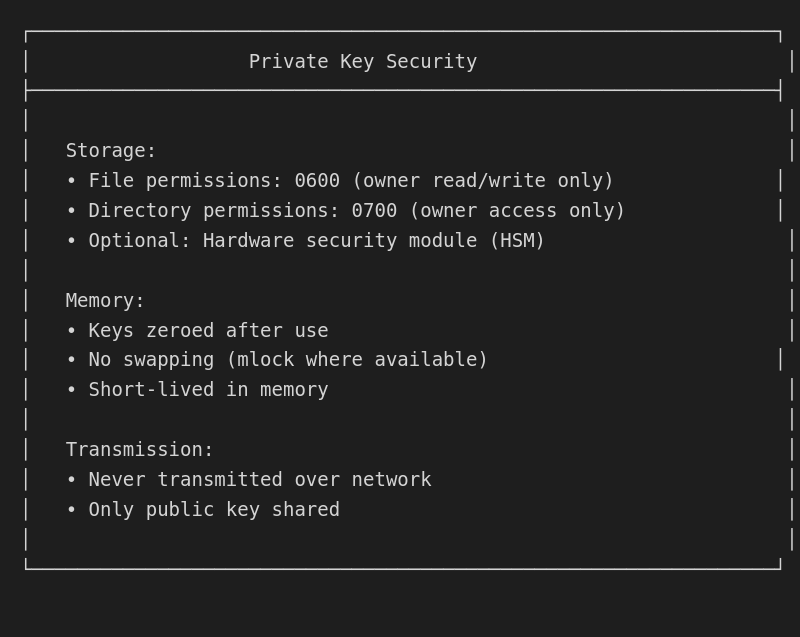
File permissions
# Recommended permissions
chmod 600 ~/.local/share/OctoMY™/*/keystore.json
chmod 700 ~/.local/share/OctoMY™/*/
Backup and recovery
# Backup key store (keep secure!)
cp ~/.local/share/OctoMY™/OctoMY\ Agent/keystore.json \
   ~/secure-backup/keystore-backup.json

# Restore key store
cp ~/secure-backup/keystore-backup.json \
   ~/.local/share/OctoMY™/OctoMY\ Agent/keystore.json
Warning: Losing your private key means losing your identity. All peers will need to re-pair with your new identity.
Key generation
Generating new identity
// Generate completely new identity
void generateNewIdentity(KeyStore& store, const QString& name) {
    // Generate RSA-2048 keypair
    store.generateLocalKey(2048);

    // Set personality name
    store.setPersonalityName(name);

    // Save to disk
    store.save();

    qDebug() << "New identity:" << store.personalityId();
}
Regenerating keys
// Regenerate keys (loses pairing!)
void regenerateKeys(KeyStore& store) {
    // Warning: This invalidates all peer relationships
    qWarning() << "Regenerating keys - all pairings will be lost!";

    // Generate new keypair
    store.generateLocalKey(2048);

    // Clear peer list (they won't recognize us)
    store.clearPeers();

    // Save
    store.save();
}
Migration
Upgrading store format
void migrateKeyStore(KeyStore& store) {
    int version = store.version();

    if (version < 2) {
        // Migrate from v1 to v2
        // Add new fields, convert formats
        store.setVersion(2);
    }

    store.save();
}
Exporting/importing peers
// Export peer list (for sharing)
QJsonArray exportPeers(const KeyStore& store) {
    QJsonArray peers;
    for (const Peer& p : store.allPeers()) {
        QJsonObject obj;
        obj["id"] = p.id;
        obj["name"] = p.name;
        obj["publicKey"] = QString(p.publicKey.toBase64());
        peers.append(obj);
    }
    return peers;
}

// Import peer list
void importPeers(KeyStore& store, const QJsonArray& peers) {
    for (const QJsonValue& v : peers) {
        QJsonObject obj = v.toObject();
        Peer p;
        p.id = obj["id"].toString();
        p.name = obj["name"].toString();
        p.publicKey = QByteArray::fromBase64(
            obj["publicKey"].toString().toUtf8());
        p.trustLevel = TrustLevel::MEET;  // Default to MEET
        store.addPeer(p);
    }
    store.save();
}
Debugging
Inspecting key store
# View key store (JSON formatted)
cat ~/.local/share/OctoMY™/OctoMY\ Agent/keystore.json | python3 -m json.tool

# Extract personality ID
jq '.personality.id' ~/.local/share/OctoMY™/OctoMY\ Agent/keystore.json

# List peers
jq '.peers[] | {name, trustLevel}' ~/.local/share/OctoMY™/OctoMY\ Agent/keystore.json
Common issues
| Issue | Cause | Solution |
|---|---|---|
| Pairing fails | Key mismatch | Re-pair from scratch |
| Identity lost | Corrupted store | Restore from backup |
| Permission denied | File permissions | Fix with chmod 600 |
| Parse error | Corrupted JSON | Delete and regenerate |