CLI Options
Reference for OctoMY™ command-line arguments and options.
Pro Tip
For testing, the --auto-delivery --auto-discovery flags are invaluable - they skip the interactive birth ceremony and automatically accept discovered peers. Combine with --personality TestBot to create isolated test environments without affecting your production nodes.
Overview
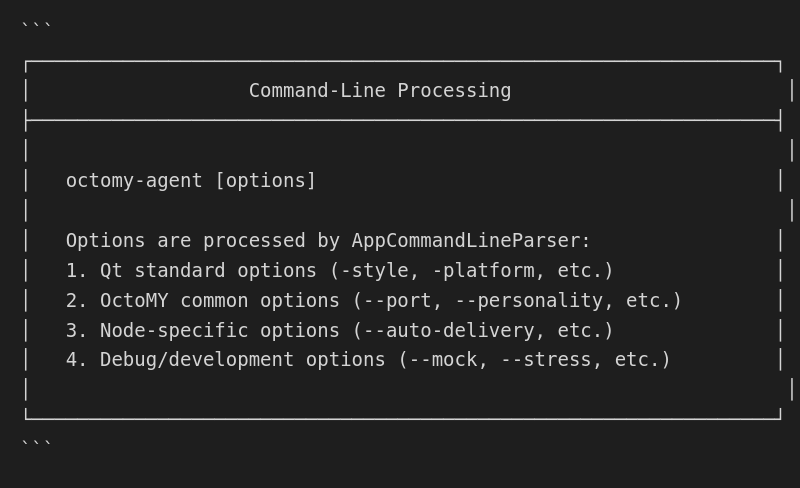
OctoMY™ applications accept command-line options for configuration:
Common options
Options available for all OctoMY™ applications:
Help and version
| Option |
Short |
Description |
--help |
-h |
Display help message |
--version |
-v |
Display version information |
Network options
| Option |
Short |
Argument |
Description |
--port |
-p |
PORT |
Override local UDP port |
--address |
-a |
ADDR |
Bind to specific address |
--no-discovery |
|
|
Disable multicast discovery |
--discovery-interval |
|
MS |
Discovery interval in ms |
Identity options
| Option |
Short |
Argument |
Description |
--personality |
-n |
NAME |
Use/create named personality |
--data-dir |
-d |
PATH |
Override data directory |
Logging options
| Option |
Short |
Argument |
Description |
--log-level |
-l |
LEVEL |
Set log level (debug/info/warn/error) |
--log-file |
|
FILE |
Log to file |
--quiet |
-q |
|
Suppress console output |
--verbose |
|
|
Enable verbose output |
Agent-specific options
Options for the Agent (robot) application:
Hardware options
| Option |
Argument |
Description |
--serial |
PORT |
Serial port for Arduino |
--baud |
RATE |
Serial baud rate |
--no-hardware |
|
Run without hardware |
Behavior options
| Option |
Argument |
Description |
--auto-delivery |
|
Auto-complete birth ceremony |
--auto-discovery |
|
Auto-accept discovered peers |
--default-plan |
NAME |
Activate plan on startup |
Connection options
| Option |
Argument |
Description |
--peer-timeout |
MS |
Peer verification timeout |
--auto-delay |
MS |
Delay before auto operations |
Remote-specific options
Options for the Remote (controller) application:
| Option |
Argument |
Description |
--joystick |
ID |
Joystick device ID |
--no-joystick |
|
Disable joystick |
--deadzone |
VALUE |
Joystick deadzone (0.0-1.0) |
Display options
| Option |
Argument |
Description |
--fullscreen |
|
Start in fullscreen |
--no-sensors |
|
Hide sensor display |
Hub-specific options
Options for the Hub (fleet management) application:
Server options
| Option |
Argument |
Description |
--max-agents |
NUM |
Maximum managed agents |
--api-port |
PORT |
REST API port |
--enable-api |
|
Enable REST API |
Storage options
| Option |
Argument |
Description |
--log-retention |
DAYS |
Log retention period |
--db-path |
PATH |
Database file path |
MockNode options
Options for the MockNode testing application:
Personality options
| Option |
Argument |
Description |
--personality |
NAME |
Use/create test personality |
--node-type |
TYPE |
agent, remote, or hub |
Automation options
| Option |
Argument |
Description |
--auto-delivery |
|
Auto-complete birth |
--auto-discovery |
|
Auto-accept peers |
--auto-delay |
MS |
Delay before auto ops |
--peer-timeout |
MS |
Peer timeout |
Testing options
| Option |
Argument |
Description |
--script |
FILE |
Run automation script |
--headless |
|
Run without GUI |
--gui-heartbeat |
|
Report every pause of the user interface over 250 ms, with its phase and (on Windows) its stack. See collect useful logs |
Usage examples
Basic usage
# Start Agent on custom port
octomy-agent --port 9000

# Start Agent with named personality
octomy-agent --personality MyRobot

# Start Agent with verbose logging
octomy-agent --log-level debug --verbose
Network configuration
# Bind to specific interface
octomy-agent --address 192.168.1.100 --port 8124

# Disable discovery (manual connections only)
octomy-agent --no-discovery

# Custom discovery interval
octomy-agent --discovery-interval 10000
Development and testing
# Run without hardware
octomy-agent --no-hardware

# Auto-complete pairing for testing
octomy-agent --auto-delivery --auto-discovery

# Log to file
octomy-agent --log-file /tmp/octomy.log --log-level debug
MockNode testing
# Create test Agent
mocknode --personality TestAgent --node-type agent

# Create test Remote with auto-pairing
mocknode --personality TestRemote --node-type remote \
         --auto-delivery --auto-discovery

# Run automation script
mocknode --personality ScriptTest --script test_scenario.txt
Graphics and diagnostics options
Every OctoMY application accepts these before or after its own options.
They are flags, not environment variables. The graphics ones are explained
in Graphics backend. The diagnostic ones are
explained in Collect useful logs.
| Option |
Description |
--rhi-backend=<name> |
Use one graphics backend and no other (vulkan, opengl, d3d12, d3d11, metal, null). With this flag there is no fallback |
--rhi-software |
Prefer the software rasterizer over a hardware GPU |
--rhi-debug |
Enable the graphics layer's own debug log |
--rhi-validate |
Attach the Khronos validation layer to every Vulkan instance the process creates. On by default in a debug build |
--no-rhi-validate |
Turn the validation layer off, overriding the debug-build default. The later of the two flags wins |
--gui-heartbeat |
Report every pause of the user interface longer than 250 ms |
--tick-trace |
Write a timeline of viewport render ticks, with a millisecond stamp on every line. This is the supported way to capture interaction diagnostics |
Standard Qt options are also available:
Display options
| Option |
Description |
-platform <platform> |
Set Qt platform plugin |
-style <style> |
Set application style |
-stylesheet <file> |
Apply Qt stylesheet |
-widgetcount |
Print widget count on exit |
| Platform |
Description |
xcb |
X11 (Linux default) |
wayland |
Wayland (Linux) |
windows |
Windows |
cocoa |
macOS |
offscreen |
Headless rendering |
Examples
# Force Wayland
octomy-agent -platform wayland

# Use custom style
octomy-agent -style fusion

# Headless mode
octomy-agent -platform offscreen
Environment variable overrides
Environment variables can override command-line options:
| Variable |
Equivalent Option |
OCTOMY_PORT |
--port |
OCTOMY_PERSONALITY |
--personality |
OCTOMY_DATA_DIR |
--data-dir |
OCTOMY_LOG_LEVEL |
--log-level |
OCTOMY_NO_DISCOVERY |
--no-discovery |
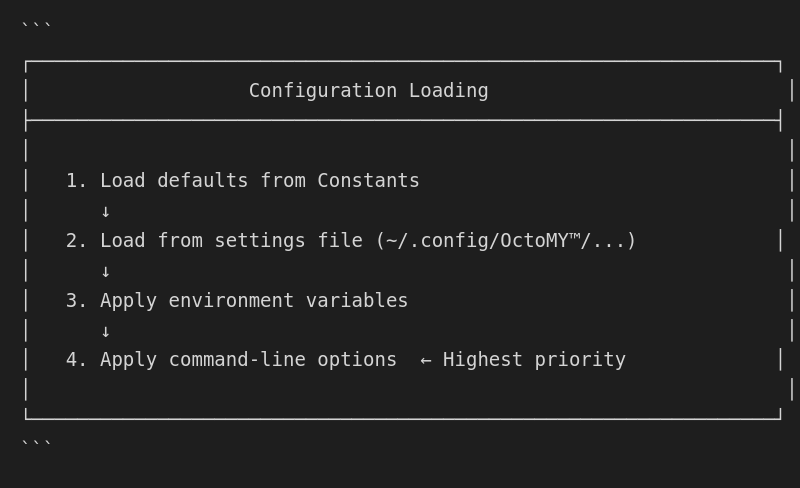
Precedence
1. Command-line options (highest)
2. Environment variables
3. Settings file
4. Default values (lowest)
Example
# Environment variable
export OCTOMY_PORT=9000

# Command-line overrides environment
octomy-agent --port 9500  # Uses 9500, not 9000
Exit codes
OctoMY™ applications return standard exit codes:
| Code |
Meaning |
| 0 |
Success |
| 1 |
General error |
| 2 |
Invalid arguments |
| 3 |
Configuration error |
| 4 |
Network error |
| 5 |
Hardware error |
| 6 |
Authentication error |
Checking exit code
octomy-agent --personality Test
EXIT_CODE=$?

if [ $EXIT_CODE -eq 0 ]; then
    echo "Exited normally"
elif [ $EXIT_CODE -eq 2 ]; then
    echo "Invalid arguments"
else
    echo "Error: $EXIT_CODE"
fi
Configuration file integration
Command-line options interact with configuration files:
Loading order
Persisting options
Command-line options are not automatically saved. To persist:
# Run with option
octomy-agent --port 9000

# Save to settings file manually
# Or use settings UI to make permanent
Script integration
Bash script
#!/bin/bash
# start_agent.sh - Start Agent with custom configuration

PERSONALITY="${1:-DefaultAgent}"
PORT="${2:-8124}"
LOG_LEVEL="${3:-info}"

exec octomy-agent \
    --personality "$PERSONALITY" \
    --port "$PORT" \
    --log-level "$LOG_LEVEL" \
    --auto-delivery
Systemd service
# /etc/systemd/system/octomy-agent.service
[Unit]
Description=OctoMY Agent
After=network.target

[Service]
Type=simple
User=robot
ExecStart=/usr/bin/octomy-agent \
    --personality ProductionAgent \
    --port 8124 \
    --log-file /var/log/octomy/agent.log \
    --log-level info
Restart=always
RestartSec=10

[Install]
WantedBy=multi-user.target
Docker
FROM ubuntu:22.04

COPY octomy-agent /usr/bin/

ENTRYPOINT ["octomy-agent"]
CMD ["--personality", "DockerAgent", "--port", "8124"]
# Run with custom options
docker run octomy-agent --personality CustomAgent --port 9000
Debugging options
Verbose output
# Maximum verbosity
octomy-agent --log-level debug --verbose

# Output includes:
# - Configuration loading
# - Network events
# - Handshake details
# - Courier activity
Dry run
# Check configuration without starting
octomy-agent --personality Test --dry-run
# Outputs: Configuration valid, would start with...
octomy-agent --version
# OctoMY Agent 1.0.0
# Qt 6.8.0
# Built: 2024-01-15
Option reference table
Complete option reference:
| Option |
Short |
Argument |
Default |
Description |
--help |
-h |
- |
- |
Show help |
--version |
-v |
- |
- |
Show version |
--port |
-p |
PORT |
8124 |
UDP port |
--address |
-a |
ADDR |
0.0.0.0 |
Bind address |
--personality |
-n |
NAME |
auto |
Personality name |
--data-dir |
-d |
PATH |
platform |
Data directory |
--log-level |
-l |
LEVEL |
info |
Log level |
--log-file |
- |
FILE |
- |
Log file path |
--quiet |
-q |
- |
false |
Quiet mode |
--verbose |
- |
- |
false |
Verbose mode |
--no-discovery |
- |
- |
false |
Disable discovery |
--discovery-interval |
- |
MS |
5000 |
Discovery interval |
--auto-delivery |
- |
- |
false |
Auto birth |
--auto-discovery |
- |
- |
false |
Auto accept |
--peer-timeout |
- |
MS |
45000 |
Peer timeout |
--auto-delay |
- |
MS |
500 |
Auto delay |
--serial |
- |
PORT |
auto |
Serial port |
--baud |
- |
RATE |
115200 |
Baud rate |
--no-hardware |
- |
- |
false |
No hardware |