Discovery Protocol
Node discovery and peer detection
Discovery Protocol
Technical reference for OctoMY™'s node discovery system, which enables nodes to find and connect to each other.
Did You Know?
OctoMY™'s adaptive discovery timing ("honeymoon scheduler") dramatically reduces network traffic - when idle, discovery broadcasts happen only once per minute, but when you open the pairing screen, the system shifts to 1-second intervals for rapid detection. This means battery-powered devices can stay discoverable without draining their batteries.
Overview
Discovery is the process by which OctoMY™ nodes detect other nodes and establish communication. The system supports multiple discovery channels that can operate independently or together.
Design principles
| Principle | Description |
|---|---|
| Multi-channel | Multiple parallel discovery methods |
| Adaptive timing | Fast discovery when active, slow when idle |
| State separation | Mandate (desired) vs Status (actual) |
| Graceful fallback | Works even when some channels fail |
Discovery channels
OctoMY™ supports six discovery channels:
| Channel | Transport | Use Case |
|---|---|---|
| Network (LAN) | UDP Broadcast | Same local network |
| Zoo | HTTPS | Internet-wide, NAT traversal |
| Bluetooth | BLE | Close proximity |
| Audio | Ultrasonic | Very close proximity |
| NFC | NFC | Touch pairing |
| Camera | QR Code | Visual pairing |
Channel selection
Channels are enabled via DiscoveryMandate:
DiscoveryMandate mandate{
    .connecting = true,     // Enable discovery
    .useZoo = true,         // Use Zoo server
    .useNetwork = true,     // Use LAN broadcast
    .useBluetooth = false,  // Bluetooth disabled
    .useAudio = false,      // Audio disabled
    .useNFC = false,        // NFC disabled
    .useCamera = false      // Camera disabled
};
LAN Discovery
The primary discovery mechanism for nodes on the same local network.
Constants
| Parameter | Value | Description |
|---|---|---|
| Port | 8473 | UDP discovery port |
| Broadcast Interval | 5000ms | Time between announces |
| Packet Size | 76 bytes | Fixed packet size |
Packet format
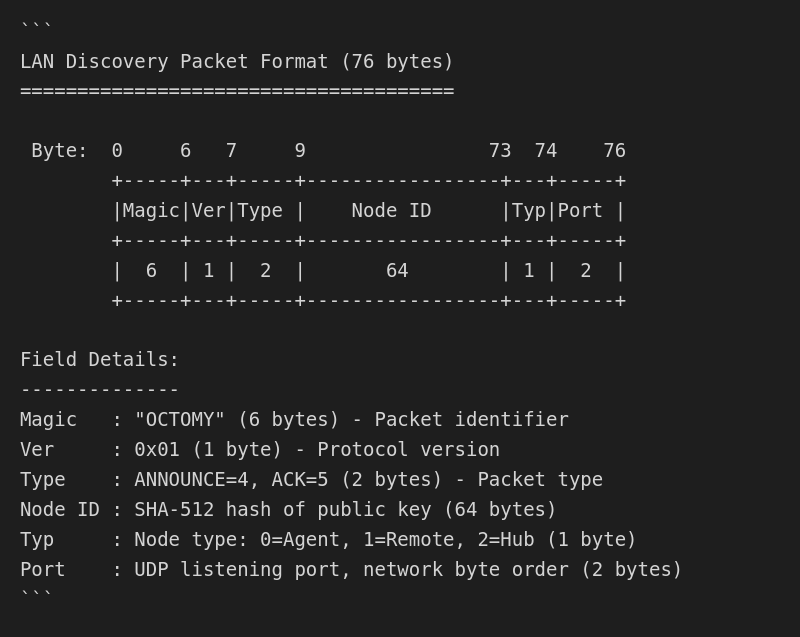
| Field | Offset | Size | Description |
|---|---|---|---|
| Magic | 0 | 6 bytes | "OCTOMY" identifier |
| Version | 6 | 1 byte | Protocol version (0x01) |
| Type | 7 | 2 bytes | Packet type (see below) |
| Node ID | 9 | 64 bytes | SHA-512 hash of public key |
| Node Type | 73 | 1 byte | Agent(0), Remote(1), Hub(2) |
| Port | 74 | 2 bytes | Node's listening port |
Packet types
| Type | Value | Description |
|---|---|---|
MULTIMAGIC_LAN_ANNOUNCE |
4 | "I exist on the LAN" (broadcast) |
MULTIMAGIC_LAN_ANNOUNCE_ACK |
5 | "I see you" (unicast response) |
Discovery flow
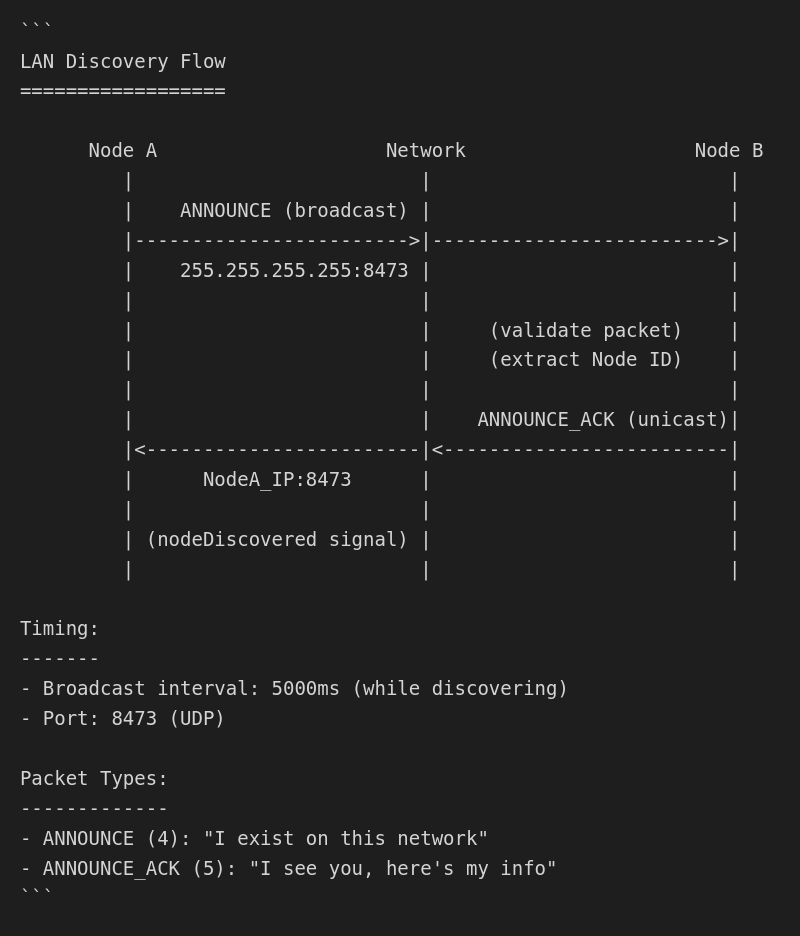
Broadcast Phase:
- Node binds to UDP port 8473
- Broadcasts ANNOUNCE packet to 255.255.255.255
- Repeats every 5 seconds while discovering
Response Phase:
- Receiving node validates packet (magic, version)
- Extracts sender's Node ID and port
- Sends ANNOUNCE_ACK directly to sender's IP:port
- Emits
nodeDiscovered(nodeId)signal
Discovery timing
Discovery uses adaptive timing via HoneymoonScheduler to balance responsiveness with resource usage.
Timing parameters
| Parameter | Default | Description |
|---|---|---|
| Triggered Interval | 1000ms | Interval when actively discovering |
| Idle Interval | 60000ms | Interval when discovery is dormant |
| Triggered Duration | 20000ms | How long to stay in triggered mode |
| Decay Time | 40000ms | Transition period from triggered to idle |
State transitions
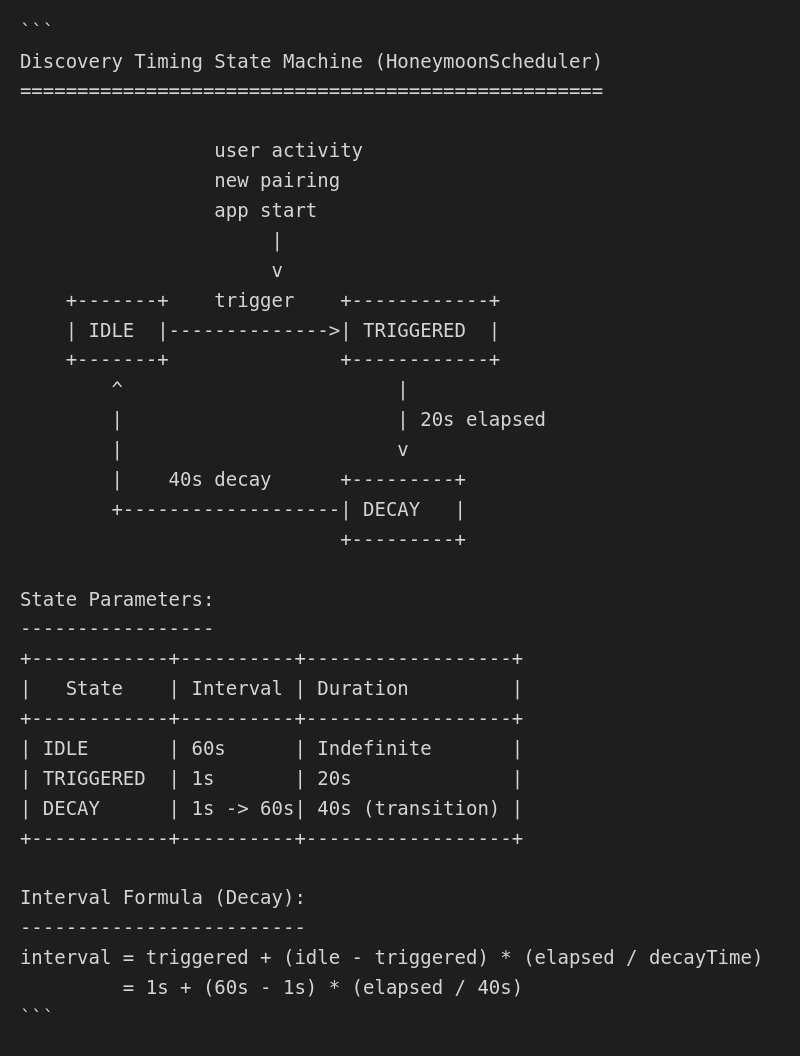
| State | Interval | Trigger |
|---|---|---|
| Idle | 60s | Default state, minimal traffic |
| Triggered | 1s | User activity, new pairing |
| Decay | 1s → 60s | After triggered duration expires |
Trigger events
Discovery becomes "triggered" when:
- User opens pairing screen
- New peer is added to address book
- Connection lost to known peer
- Application starts
State management
Discovery separates desired state (mandate) from actual state (status).
DiscoveryMandate
Represents what the user wants to happen:
struct DiscoveryMandate {
    bool connecting;     // Should we be discovering?
    bool useZoo;         // Use Zoo server?
    bool useNetwork;     // Use LAN broadcast?
    bool useBluetooth;   // Use Bluetooth?
    bool useAudio;       // Use audio?
    bool useNFC;         // Use NFC?
    bool useCamera;      // Use camera?
};
DiscoveryStatus
Represents what is actually happening:
struct ChannelStatus {
    bool active;              // Currently running?
    bool attempting;          // Trying to start?
    qint64 lastActivityTime;  // Last successful operation
    qint64 lastAttemptTime;   // Last start attempt
    QString lastError;        // Error message if failed
};
Status queries
DiscoveryStatus status = discoveryClient->status();

// Per-channel status
ChannelStatus lan = status.networkStatus();
ChannelStatus zoo = status.zooStatus();
ChannelStatus bt  = status.bluetoothStatus();

// Check if any channel is active
bool anyActive = status.isAnyActive();

// Check if trying to connect
bool trying = status.isAttempting();
Discovery classes
DiscoveryClient
Main orchestrator for client-side discovery.
Source: src/libs/libpair/discovery/DiscoveryClient.hpp:81
| Method | Description |
|---|---|
configure(node, ...) |
Set up discovery with timing parameters |
activate(enabled) |
Start/stop discovery |
setMandate(mandate) |
Set which channels to use |
status() |
Get current status |
discover(running) |
Trigger discovery event |
Signals:
| Signal | Description |
|---|---|
discoverRequest() |
Discovery cycle started |
discoverResponse(bool) |
Discovery cycle completed |
nodeDiscovered(QString) |
New node found (NodeID) |
DiscoveryServer
Server-side handling of discovery requests.
Source: src/libs/libpair/discovery/DiscoveryServer.hpp
Receives discovery announcements and responds with node information.
LANDiscovery
UDP broadcast implementation.
Source: src/libs/libpair/discovery/LANDiscovery.hpp
| Method | Description |
|---|---|
start() |
Begin broadcasting |
stop() |
Stop broadcasting |
discover() |
Send single announce |
setPort(port) |
Set listening port |
Zoo discovery
For nodes behind NAT or on different networks, Zoo servers provide discovery.
Flow
- Node registers with Zoo server (HTTPS)
- Provides Node ID, node type, external address
- Zoo stores registration
- Other nodes query Zoo for registered nodes
- Zoo provides peer's public address for NAT punch
Advantages
| Feature | Benefit |
|---|---|
| Internet-wide | Find nodes anywhere |
| NAT traversal | Works behind firewalls |
| Persistent | Registration survives restarts |
| Secure | HTTPS transport |
Discovery events
Event flow
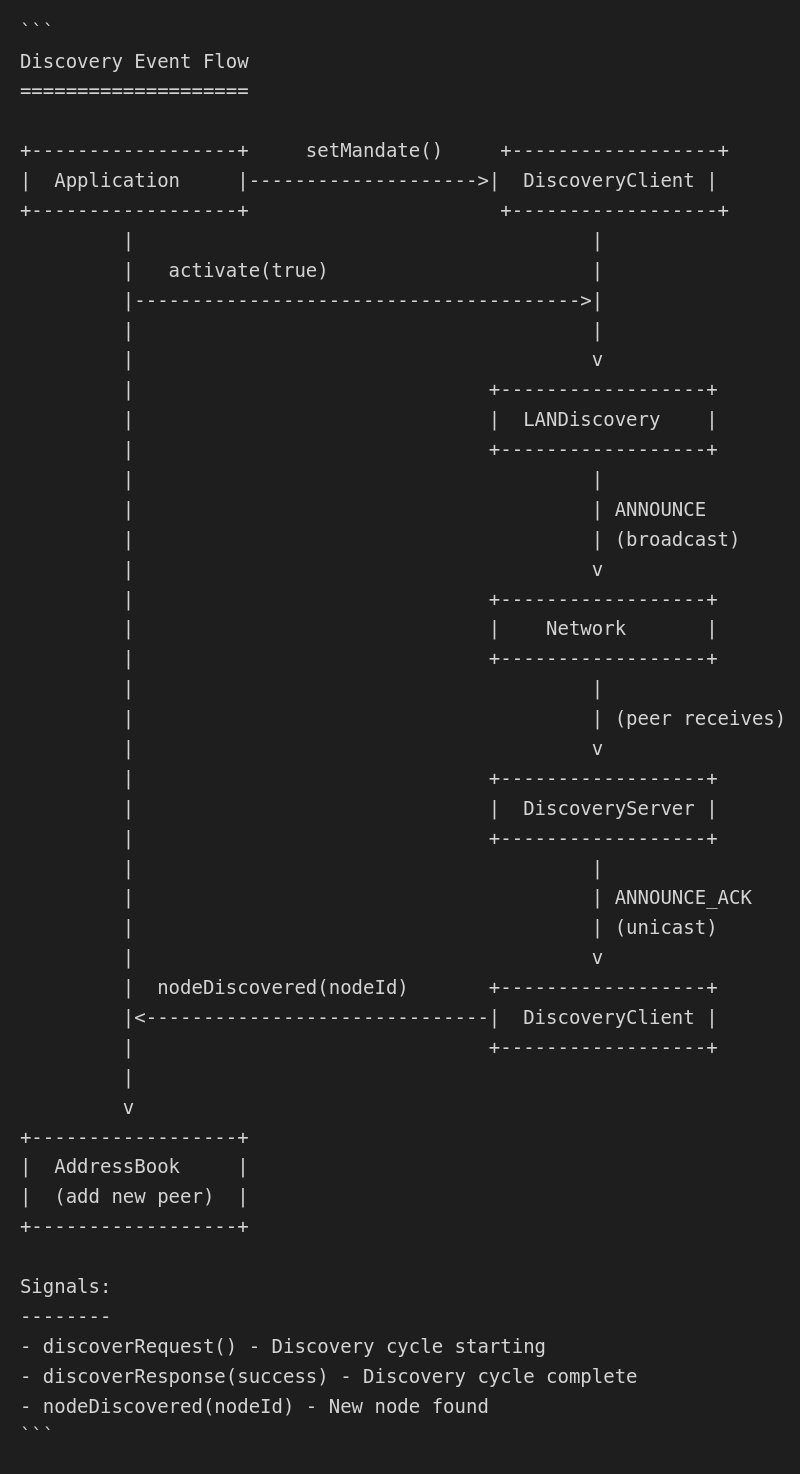
Event types
| Event | Payload | Description |
|---|---|---|
nodeDiscovered |
NodeID | New node detected |
nodeUpdated |
NodeID, Address | Node address changed |
nodeLost |
NodeID | Node no longer responding |
discoveryStarted |
Channel | Discovery channel activated |
discoveryStopped |
Channel | Discovery channel deactivated |
Packet validation
Magic validation
static const char MAGIC[] = "OCTOMY";  // 6 bytes

bool validateMagic(const QByteArray &packet) {
    if (packet.size() < PACKET_SIZE) return false;
    return memcmp(packet.data(), MAGIC, 6) == 0;
}
Version check
const quint8 CURRENT_VERSION = 0x01;

bool validateVersion(quint8 version) {
    return version == CURRENT_VERSION;
}
Node type validation
enum NodeType : quint8 {
    TYPE_AGENT  = 0,
    TYPE_REMOTE = 1,
    TYPE_HUB    = 2
};

bool validateNodeType(quint8 type) {
    return type <= TYPE_HUB;
}
Security considerations
Threats
| Threat | Mitigation |
|---|---|
| Spoofing | Node ID is hash of public key |
| Replay | Timestamps in discovery records |
| DoS | Rate limiting on discovery port |
| Sniffing | Discovery is low-sensitivity data |
Best practices
- Only trust discovered nodes after key exchange
- Rate limit discovery processing
- Validate all packet fields before use
- Use Zoo for sensitive environments
Integration example
// Configure discovery
auto client = mNode->discoveryClient();
client->configure(mNode, 1000, 60000, 20000, 40000);

// Connect signals
connect(client, &DiscoveryClient::nodeDiscovered,
    this, &MyClass::onNodeDiscovered);

// Set mandate (enable LAN + Zoo)
DiscoveryMandate mandate{
    .connecting = true,
    .useZoo = true,
    .useNetwork = true
};
client->setMandate(mandate);

// Activate
client->activate(true);

// Trigger immediate discovery
client->discover(true);
Troubleshooting
Common issues
| Issue | Cause | Solution |
|---|---|---|
| No nodes found | Firewall blocking UDP 8473 | Open port 8473 |
| Discovery slow | Default idle timing | Trigger discovery mode |
| Only Zoo works | Different network segments | Use Zoo or VPN |
| Status shows errors | Channel not available | Check hardware/permissions |
Debug logging
Enable discovery debug output:
qputenv("QT_LOGGING_RULES", "oc.discovery.debug=true");