SpecWorkspace
The spec workspace: a tree of specs, sections and work units, an editor, and a context rail.
| Inherits | QWidget |
| Group | libtrove |
In the namespace octomy::trove::workspace. Declared in src/libs/libtrove/trove/workspace/SpecWorkspace.hpp.
Detailed description
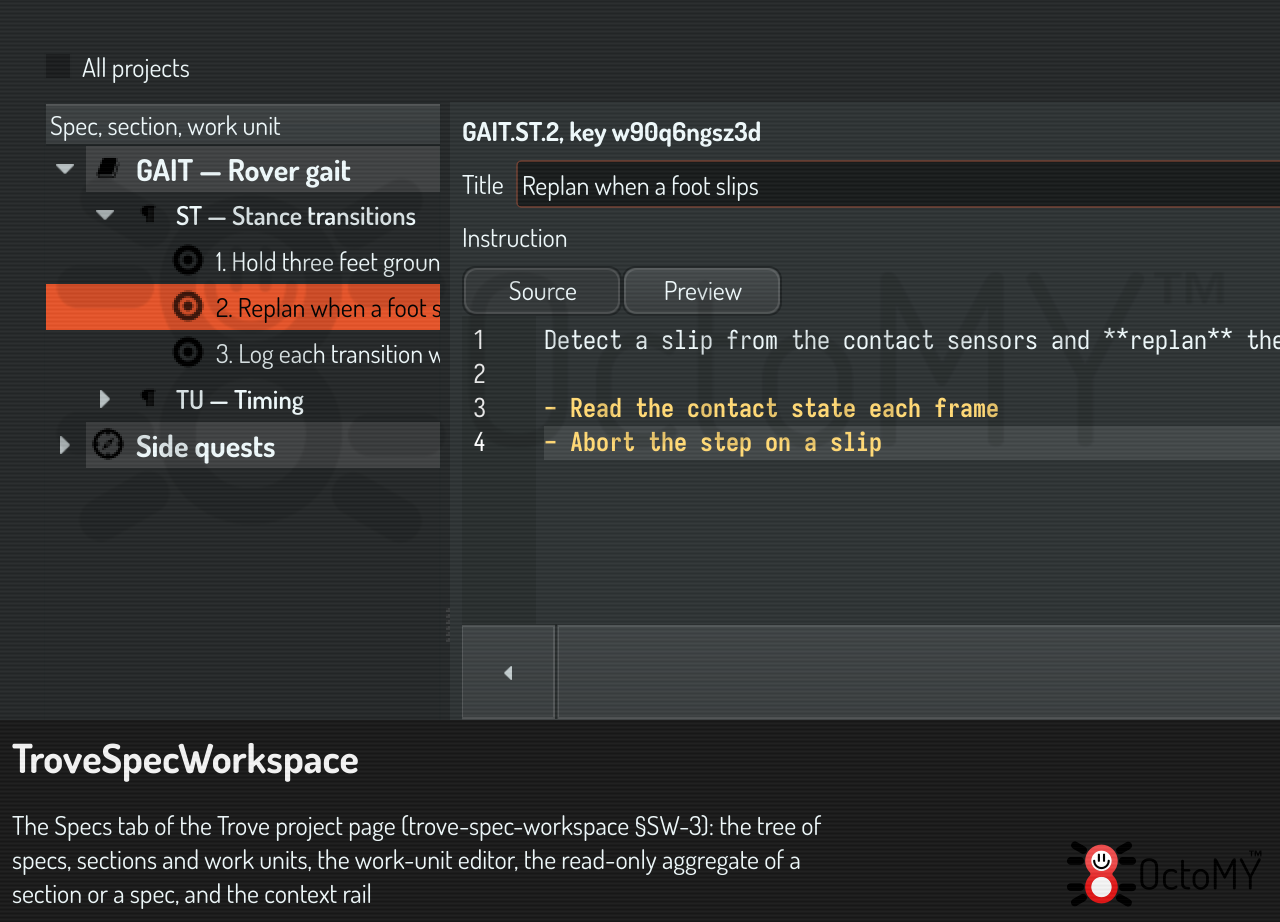
The direct view of the spec database that trove-spec-workspace §SW-3 asks for, as the Spec tab of the Trove board. Three panes share one selection:
- The tree, a QTreeView over SpecTreeModel. It shows the specs and the side quests of the board's project, or of every project when "All projects" is ticked (§SW-2).
- The detail. For a work unit it is the WorkUnitEditor. For a spec, a section or the side quests it is the read-only aggregate of §SW-4.1: a QListView over SpecAggregateModel, painted by SpecAggregateDelegate. A click opens or closes a unit's body. A double click selects the unit in the tree, which opens its editor.
- For a spec, the aggregate page also holds the RecurringPanel: the switch, the settings, the runs and the trend of the spec as a recurring spec (trove-recurring §TRC-D-10). The tree's Recurring group links to the same page.
- The context rail: for a work unit, the state of its Definition of Done, what it depends on, the last writer of each body field and its history. For a group, its rollup.
Reads and writes
The workspace reads through the store pointer that the Trove service holds (TroveProjectManager::specStore()), with StoreSpecTreeSource. It writes only through the spec.* tasks and runs work only through trove.dispatch, with SpecWorkspaceActions (§SW-5).
It follows the store live
Every write of the store posts its key to SpecStore::changes(): a write of this HUB, of a session through the door, or of the trove tool in a terminal. The workspace collects the keys for kFollowDelayMs, then calls followStore(). The tree changes only the rows that differ (SpecTreeModel::refresh()), so expansion, selection and scroll stay. The aggregate shows its group again with the same open bodies and the same scroll position. The editor shows the new state of its unit, unless it holds edits: then it keeps them and says that the unit changed elsewhere (WorkUnitEditor::followWorkUnit()). The reload button stays for a store that another process wrote.
A workspace that cannot work says so
§SW-8: without a sentient and a node identity there is no spec database. The workspace then shows unavailableReason(), which names the way out, in place of empty panes. An empty corpus also says so, and says where to author a spec.
See also SpecTreeModel, SpecAggregateModel, WorkUnitEditor, SpecWorkspaceActions, TroveProjectActivity.