Play a networked 1v1 RTS match
Start and play a deterministic-lockstep 1v1 against a connected peer
Play a networked 1v1 RTS match
The RTS pilot is a deterministic-lockstep, two-player real-time strategy game that runs between two connected OctoMY nodes. This guide walks through starting a match against a peer, the in-game controls, and how the game reports the outcome or a lost connection.
Before you start
You need two nodes that are paired and connected:
- Pair the two nodes (see Pairing) so they trust each other.
- Confirm they have a live connection (see Connection) — the match lobby only lists peers with an established session.
The match is peer-to-peer: there is no server and no AI opponent.
Start a match
Matches are arranged in the RTS Multiplayer activity — a match browser and staging lobby in the StarCraft-1 style:
- Open RTS Multiplayer from the apps menu on both nodes. Opening it switches the node to reachable automatically.
- Hosting: pick a map from the map list (procedural boards from 24×24 up to the scrolling 1024×1024 Colossus) and a win condition (see below), then choose Host new game. Your game is advertised to every trusted, connected peer and you land in its lobby.
- Joining: open games appear in the browser list as their advertisements arrive (broadcast every ~2 s). Select one and choose Join selected game.
- In the lobby each player picks a faction — or Random, which stays secret and is rolled identically on both nodes the moment the match starts — and checks Ready. A lobby chat is available while you wait.
- When the lobby is full and everyone is ready, the host chooses Start match. A synchronized 3-second countdown runs on every node, then the game begins.
The win condition is a host-owned lobby setting (guests see it, only the host changes it), alongside the map. Elimination (the default) is last-army-standing; Domination also hands the win to the first player to field a set number of units; Control Point also wins for a player who holds the central region of the board with enough units. Whatever you pick, win-by-elimination always remains as a fallback, and the choice is just a few extra match rules layered on — so it runs in perfect lockstep like everything else.
The negotiated setup — the host's rolled seed, both factions in seat order, the chosen map, and the win condition — is identical on every peer; the lockstep session-init then confirms it (the node with the lower id acts as the authority, and its copy is the final word). All factions, units and maps are defined as game-content data rather than code, and a fingerprint of that content travels with the match setup: if two players somehow hold different content, the match refuses to start instead of desyncing mid-game.
How it stays fair
Both nodes run the same simulation from the same inputs, step for step. Neither side trusts the other's game state — only compact commands cross the network — so a modified client cannot cheat the simulation, only desync itself (which the game detects and reports).
In-game controls
| Input | Action |
|---|---|
| Left-click a unit | Select it (only your own units select) |
| Right-click a tile | Move the selection there |
| Right-click an enemy | Attack it |
| S | Stop the selection |
| A then left-click | Attack-move: walk there, engaging any enemy encountered on the way (right-click cancels the armed order) |
| D then left-click | Cast the selected unit's active ability at that spot (right-click cancels; only units that have an ability arm) |
| Q–Y | Train the 1st–6th unit type on a selected producer (your Worker) |
| Ctrl+1–9 | Assign the selection to a control group |
| 1–9 | Recall a control group; press twice to center the camera on it |
| Middle-click a tile (board or minimap) | Drop a map ping there — a marker every player sees, for calling attention to a spot |
| P | Pause / resume — synchronized, both worlds freeze on the same turn |
| Ctrl+S | Save the match position as a snapshot (see Saving and resuming) |
| + / − | Speed the game up / slow it down — negotiated, takes effect for every player on the same turn |
| Esc | Leave the match (asks for confirmation; leaving concedes). On a finished match: continue to the debrief |
| F10 | Concede the match immediately |
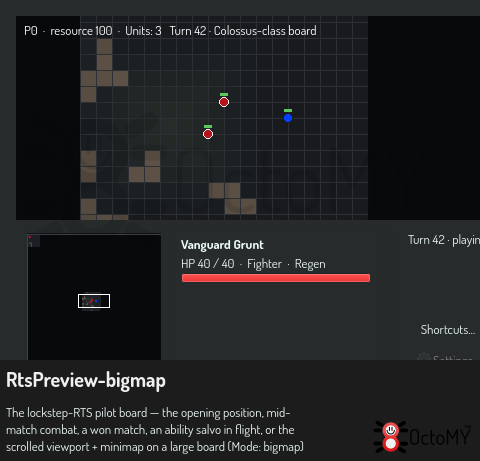
Below the board runs the match panel row: the minimap on the left, the selection panel in the middle, and the current status line plus live lockstep/network diagnostics on the right (always visible — if a match ever stalls, the panel says why). Every key above is rebindable — the Shortcuts… button in the panel opens the settings window on its keyboard shortcuts (Change a keyboard shortcut). The Settings… button below it, or Ctrl+, on the board, opens the RTS settings window with your player colors.
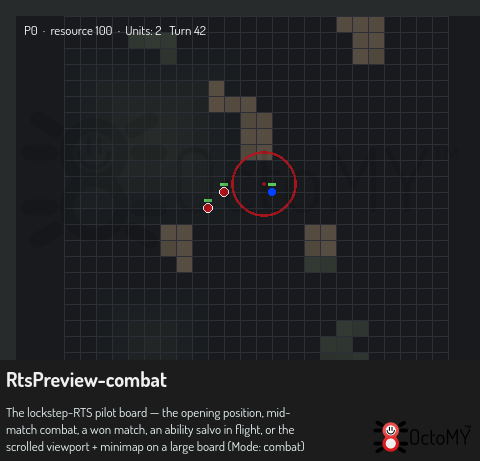
The selection panel reflects whatever you have selected: a count and a per-class breakdown (3 units selected · 2×Grunt · 1×Marksman), or, for a single unit, its faction and class name plus its capability tags (Producer · Fighter · Support · Caster, derived from what the unit can actually do — a unit class is just a name and whatever capabilities it carries, in any combination), a health bar, and — on a producer that's training — the production queue with a progress bar and the turns remaining. If the selection matches a control group, its digit shows as a badge (a ~7 badge means the selection is part of group 7). Middle-click anywhere on the board or minimap to drop a map ping — an expanding ring in your seat color that everyone sees for a few seconds, regardless of fog; it's how you call a teammate's or opponent's eye to a spot without saying a word.
Every action — yours, and any issued by an OPAL/LLM operator — travels the same command stream, so there is one authoritative path into the simulation.
Navigating the map
Small boards fit on screen; on the larger maps the view becomes a scrolling window onto the world, StarCraft-style — there are no scrollbars:
- Edge scroll: push the mouse against any edge of the board and the camera pans that way.
- Arrow keys pan too; hold them for continuous scrolling.
- Minimap: the whole board lives in the panel row's left cell — every unit as a dot in its player's color, with a white rectangle marking what the main view shows. Click (or drag) anywhere on it to throw the camera there instantly.
- Control groups: recall a group with its digit twice in quick succession and the camera centers on those units.
The match opens with the camera on your own starting corner.
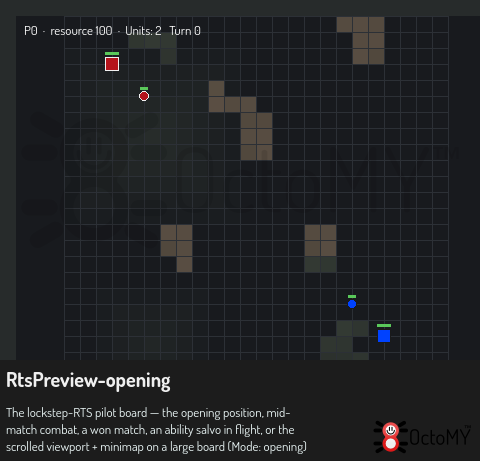
Boards are not empty fields: each one is generated from the match seed, identically on both nodes. Rock formations block movement — units find their own way around them (and around parked units; a unit ordered onto an occupied spot waits beside it until it frees up) — and open ground carries subtle elevation shading. Both starting corners are always kept clear and connected, and the minimap shows the same terrain at a glance. Right-clicking the minimap sends the selected units there without moving your view.
Fog of war
You only see what your units see. Each unit lights up the ground around it; unexplored ground is black, and ground you have scouted but no longer watch stays under a dark shroud — the terrain is remembered, but enemy units in it are not shown (and can't be clicked; attack-moving units also only engage enemies your side can actually see). Scouting therefore matters: send a fast unit ahead to light the way, and watch the minimap — it carries the same shroud, so the lit pockets are exactly where you have eyes. Both simulations still march in lockstep under the hood; fog is a per-player view of the same shared world, which is why replays can show it all.
Abilities & projectiles
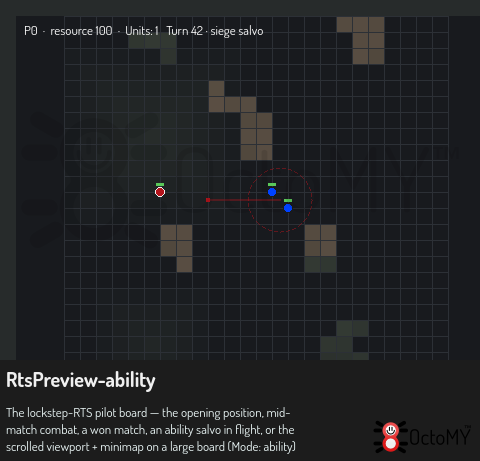
Some units carry an active ability — for both starting factions it's the heavy unit's siege salvo: a splash projectile that arcs to a target and detonates. Select the unit, press D, and left-click where you want it to land (right-click cancels; the cursor turns to a crosshair while armed). The shot travels for a moment — you'll see it fly with a dashed circle marking the blast footprint — then explodes, damaging every unit inside that radius.
That splash is owner-agnostic: your own units caught in the blast take damage too, so mind your positioning before you fire into a melee. After a cast the ability goes on cooldown for a fixed number of turns before it can be used again.
Abilities are defined in game content (cooldown, range, blast radius, damage, projectile speed), so new ones arrive with new rosters rather than new code — and, like everything else, a cast is just one more command in the shared stream, identical whether it comes from a key, a click, or an OPAL operator.
Veterancy
Fighting units earn rank by getting kills — a few kills promote a unit, and each rank makes it hit noticeably harder. Ranked units show small chevron pips above them, so a battle-hardened squad is easy to spot. Keeping a veteran alive is worth it: a rank-2 melee outfights a fresh one. Which units gain veterancy, how many kills a rank costs, and how big the bonus is are all game-content settings.
On top of individual rank, you can research an army-wide attack upgrade at a producer — each level (up to three) spends resources and makes every one of your units hit harder. Rank rewards a single unit's survival; the upgrade lifts your whole army at once.
Support units
Some rosters field a support unit — marked with a small green cross — that carries no attack but steadily heals nearby friendly units each turn, up to their full health. Keep one behind your front line and a wounded squad mends between fights instead of dying by attrition; the aura reaches every ally within its radius, so a tight formation heals faster than a scattered one. It won't revive a unit that has already fallen, and it never heals itself or the enemy. How much it heals and how far the aura reaches are game-content settings, so different factions' healers feel different (one may heal a little over a wide area, another more over a tight one).
Faction traits
Each faction plays differently — not just different numbers, but a distinct faction-wide mechanic. Vanguard units regenerate: a wounded unit slowly repairs itself once it has been out of combat for a few turns, so pulling a damaged force back to safety pays off. Syndicate units collect a bounty: every kill refunds a share of the fallen unit's cost as resources, so an aggressive, trade-heavy Syndicate army funds itself. A unit's trait shows as a tag in its selection panel. Which traits a faction has, and how strong they are, are game-content settings — a bundle can give any faction any mix.
Supply
Each unit takes up supply (population), and every player has a supply cap. Once you hit it, training is refused until you free up room — so armies have a ceiling and expansion has to be planned, not spammed. How much supply each unit costs and where the cap sits are game-content settings.
Winning, losing, and conceding
The match ends by elimination: when one player has no units left and the other still has some, the survivor wins. F10 concedes immediately — your units are removed and your opponent wins.
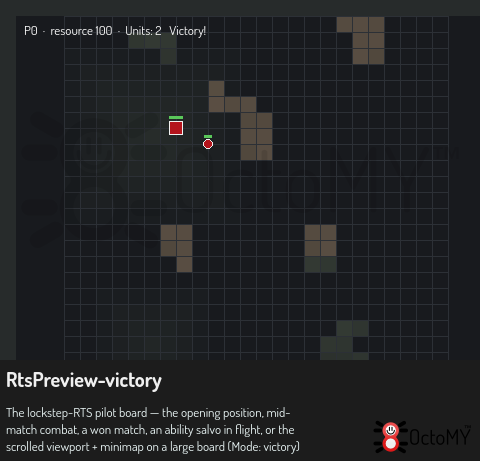
The result is announced with a full-screen banner over the dimmed board — Victory!, Defeat, or Draw (neither side has units). Choose Continue in the match panel (or press Esc) to reach the debrief: the result, match length, and per-player statistics (units alive, trained, lost, resources). Closing the debrief returns you to the lobby, which resets for a rematch — everyone simply readies up again.
Troubleshooting
- "waiting for peer…" — the game is stalled at the turn barrier because your opponent's turns haven't arrived. Brief pauses are normal on a busy link; a persistent stall means the peer has fallen behind or the connection has degraded.
- The match returns to the lobby by itself — the peer's connection dropped mid-match (a connection-lost result). Reconnect (see Connection) and start again.
- "DESYNC at turn N — match halted" — the two simulations diverged and the game halted to avoid an inconsistent result. This should not happen in normal play; if it does, it indicates a bug — capture the turn number and report it. Operators can inspect the divergence with the
lockstep.diagnose-desynctask.
Replays
Every match records itself automatically — the last 50 recordings are kept. From the RTS menu, Replays lists them; Watch (or the View replay button on the post-match debrief) plays a recording back at 0.5-8x speed. A replay is the complete deterministic input of the match, so it doubles as a bug report: if something odd happens in a game, the matching file in your replays folder is exactly what a developer needs to reproduce it turn by turn.
Watching from a chosen side. A replay holds the whole world, so in the viewer you can pick a team and a fog mode to review the match from anyone's point of view: No fog shows everything (the default); Full fog shows exactly what that team saw during the game (unexplored black, scouted-then-lost ground shrouded, enemies hidden where they weren't seen); Semi fog shows the whole board but dims the areas that team couldn't see — handy for spotting what a player was missing.
Sharing replays. The viewer's Export… button saves the open replay to a file of your choosing, and the Replays list's Import… button brings one in from disk (a bad file is refused, not loaded) — so a replay can be archived or handed to someone else beyond the auto-kept 50.
Saving and resuming
A match position can be saved as a snapshot and picked up again later — even after quitting and restarting OctoMY. A snapshot is a complete copy of the deterministic game state at an exact turn, stamped with a checksum of that state: when it is loaded, the game rebuilds the world and proves the rebuilt state matches the stamp before letting you continue, so a corrupt file, a truncated download, or a save from a build with different game content is refused up front rather than misbehaving mid-game.
- In solo practice (a match continued from a replay, or a resumed save), the match panel has a Save button — press it any time to store the current position. The last 50 saves are kept.
- Resuming: saves appear at the top of the Replays list; select one and the button reads Resume — you continue playing from the saved turn, as the seat you were playing when you saved.
- In a live networked match, press Ctrl+S (or use the OPAL task
rts.save, see below) — the file lands in the same saves list, and can be resumed solo, sandbox-style.
Surviving disconnects and crashes
A match no longer ends the moment someone's connection drops. The remaining players see who the game is waiting for in the panel diagnostics and the match simply holds for a grace window (about 15 seconds); if the connection comes back in time, play resumes as if nothing happened. Only when the window runs out does the match end with a connection-lost result.
If OctoMY itself crashes (or the machine dies) mid-match, restart it and open RTS Multiplayer: a Rejoin last match button appears while your side of the match is still being held open. Pressing it reconnects to the other players, asks them where the match stands, fetches the exact game state from the furthest-along player, and drops you back into the barrier — verified against the same checksums as everything else, so a rejoin can never silently corrupt a match. Orders you issued in the last moments before the crash are honestly lost (they never reached anyone).
Driving matches from OPAL
Replays are inspectable headlessly through rts.replay.list / rts.replay.info / rts.replay.verify (re-simulates and reports the first divergence turn) / rts.replay.dump (world state at a turn as JSON), and moved with rts.replay.export (copy a recording to a path) / rts.replay.import (validate a file and adopt it into the store). Match snapshots have the same treatment: rts.save stores the live match's exact state (optionally named), and rts.load validates a save — newest by default, or by name/path — by fully rebuilding the state and checking it against the save's own checksum, reporting the turn, players, map and result. The whole flow is scriptable for LLM operators through the rts.match.* task family: rts.match.list shows advertised games, rts.match.create / rts.match.join enter a lobby, rts.match.set picks faction and readiness, and rts.match.start (host only) runs the countdown. Every task drives the same courier intents as the lobby UI. In-game, the existing rts.query-state / rts.issue-command / rts.surrender tasks apply — and rts.issue-command takes a ping command (an x/y map ping, no units) and an ability command (units[0] = caster, x/y = target) alongside move / attackmove / attack / stop / train / build, so an operator can flag a spot exactly as a middle-click would, time an ability cast (rts.query-state reports each ability-bearing unit's remaining cooldown), or research the army-wide attack upgrade at a producer.
See also
- liblockstep reference — the deterministic framework behind the match.
- Connection — configure and monitor the link the match runs over.