Expression columns
Add your own input columns to the stroke parameter grid: each one is a formula over the stroke's raw inputs — pressure, speed, arc length, per-dab randoms, time — whose 0–1 result modulates outputs exactly like pressure does.
Adding a column
In the Stroke tab's parameter grid, click the red +ƒ header to the right of the last input column. A new expression column appears (visible immediately, red-hued header) and the editor opens:
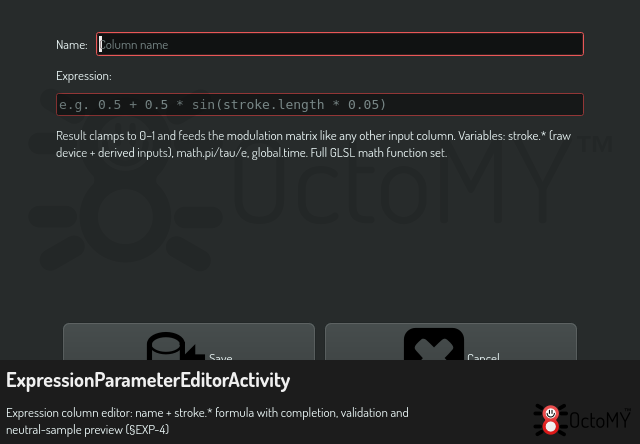
The editor gives you:
- Name — shown vertically in the column header.
- Expression — with completion for every variable and function, live validation, and an evaluated preview against a neutral sample.
- Copy — puts the expression text on the clipboard.
Click the column's header any time to re-open the editor; drag the header to reorder the column among the inputs; right-click it to delete the column (with confirm).
Wiring it up
The column's cells are ordinary modulation cells: set a weight in the row of the output you want driven. The expression's clamped 0–1 result blends with the other wired inputs by the same weighted-mean rule the fixed columns use. Try:
0.5 + 0.5 * sin(stroke.length * 0.05)
wired to Diameter — the stroke ripples as it travels.
Variables
Expressions see the stroke's raw values (the fixed grid columns see normalized 0–1 forms):
stroke.*—pressure,tiltAltitude,tiltAzimuth,barrelRotation,tangential,time(s),length(px),direction(rad),speed(px per event),random1..3(0–1, per-dab, replay-stable),opacityUnder(committed alpha under the cursor).math.pi,math.tau,math.e.global.time— seconds since app start. Replays with replay-time values (documented lossy).
The full GLSL math function set is available (sin, mix, clamp,
smoothstep, …). The complete variable table with ranges lives in
the stroke inputs reference.
Errors never block the stroke
A column that fails to compile (or errors at runtime) shows an intensified red header with the diagnostic in its tooltip, and evaluates to 0 until fixed — painting keeps working throughout.
Persistence
Expression columns save with stroke presets (applying a preset replaces the column set), persist with your brush state across restarts, and ride journal records so replays reproduce the stroke.