Give OPAL a reference
Attach a file, or name a URL, for OPAL to read
Give OPAL a reference
OPAL builds better when it can read what you mean: a datasheet, a drawing, a product page. There are two ways to give it one, and they end in the same place.
| You have | Do this |
|---|---|
| A file, a folder or an archive | Drop it on the chat input |
| A URL | Put the URL in your message, or in a note you attach, and ask OPAL to read it |
Either way, OPAL gets an attachment: material it reads a part at a time,
with the same attachment.* tasks. Nothing is pasted into the conversation,
so a long document does not use up the conversation before you ask anything.
Drop a file
Drag a folder, an archive or a single file onto the chat input. A PDF is read as text, page by page, so OPAL can quote a page number back to you.
Use the chat overlay → Give the assistant a folder or an archive says what it can do with what you dropped, and how to take it back.
Name a URL
Write the URL where you would write it for a person:
- "Build the part on this page: https://www.example.com/servo-bracket.html"
- A note that says the same, attached to your message.
OPAL fetches the page into an attachment and reads its text first. An HTML page arrives with its own images, because a datasheet's figures often carry the dimensions its text refers to. A PDF or any other file arrives under its own name.
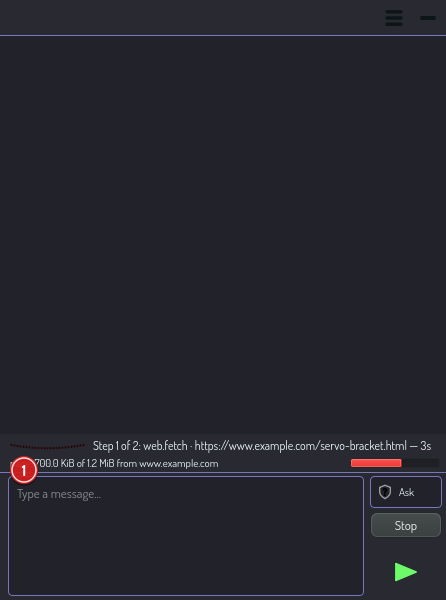
While the page arrives, the busy row says how far it has got. When the host sends the size, the bar is the bytes received against that size. When it does not, the bar is the time used of the timeout, and the row says so. Press Stop to cancel a slow fetch. OPAL is told that you cancelled it, and does not try again on its own.
When OPAL asks first
In safe mode, OPAL shows an approval card before it fetches. The URL usually
comes from OPAL, not from you: a page or an attachment can name the next URL.
The card shows where the request goes, so you can check it.
Two fetches ask every time, in ask and safe mode. In all mode OPAL asks
nothing, for these as for every other step:
| The fetch | Why it asks |
|---|---|
| A file larger than 2 MiB, up to 100 MiB | The card shows the size the host declared, so you decide on the real number |
| A host on your local network, such as a test server | A page on the internet must not reach a service on your network without you |
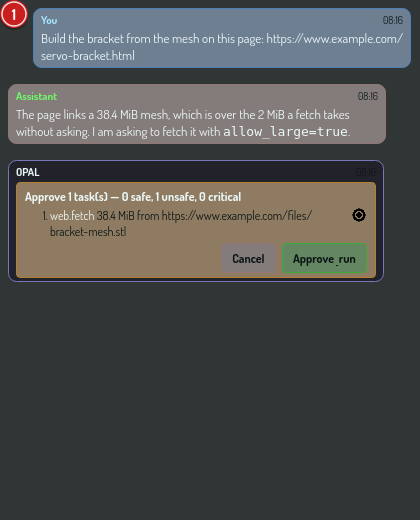
A file over 100 MiB is refused. Download it yourself and drop it on the chat input instead.
Change the limits
Open OPAL settings from the chat's menu (☰). It opens the app's settings page at its OPAL section.
| Setting | Default | What it decides |
|---|---|---|
| Fetch timeout | 20 s | How long one fetch may take in all, its redirects included |
| Large fetch timeout | 300 s | How long a fetch you approved as large may take |
| Size without asking | 2048 KiB | The largest file OPAL fetches before it asks you. Nothing goes over 100 MiB |
| Present as a browser | On | Send an ordinary browser's user agent, so a site does not refuse the page. It hides nothing |
A change applies to the next fetch. OPAL cannot change these settings itself: a change through a plan needs the device owner.
What OPAL cannot do
| It cannot | What to do instead |
|---|---|
| Log in, or read a page that needs an account | Save the page or the file, and drop it on the chat input |
| Submit a form | Fill it in yourself, and give OPAL the result |
| Run JavaScript | A page that builds its content in the browser reads as empty. OPAL says so. Save the page from your browser, and drop the file |
| Follow links | Give OPAL each URL you want it to read. It reads the page you name and its own images, nothing more |
| Read a scan | A PDF with no text layer has no text to read. See Give the assistant a folder or an archive |
How long a fetch lasts
A fetched page lasts for as long as the application runs. The copy is removed when you click the × on its tag, or the next time the application starts. A conversation you open again later names the attachment, and OPAL fetches the page again if it needs it.
See also
web.fetchreference — every argument, output and refusal.- OPAL permissions → web.fetch
- Ask OPAL to look at your scene