Trove — Overnight Autonomous Coding
Queue autonomous OctoMY™ claude coding sessions and review finished branches at dawn
Trove — autonomous coding in lanes
Trove runs many autonomous claude coding sessions on one git project, organised
as lanes. A lane is your desk for one line of work: you write the spec and a
short plan on its spec side — talking to a per-lane assistant — while the
impl side autonomously carries out the previous plan. Queue plans in the evening,
let the lanes grind, and review a hoard of landed work in the morning. Every side
runs in its own git worktree, so nothing steps on your main checkout.
You are responsible for ToS compliance. Trove is built to be made compliant by configuration, not by rewriting code. Before running unattended work you must independently verify what you do against the live Anthropic Usage Policy and consumer terms — these change often. Defaults are deliberately conservative: unattended auto-resume off, a spawn stagger so sessions never start back-to-back, API-overflow off. See What Trove does on your behalf.
Prerequisites
- A working OctoMY™ build — see Build for Linux desktop.
- The
claudeCLI installed and logged in to your subscription (claudeonce interactively, complete the login). Trove draws the Max/Pro subscription pool; it never reads or stores your token, and it runs withANTHROPIC_API_KEYunset so work is never silently billed per-token. - A git repository to work on (the "target repo"). Dogfooding target: OctoMY itself.
The lane model
A lane is a long-lived pair of worktrees + branches on the target repo:
lane-<X>-spec— your desk. You edit spec and plan documents here, with the lane's own spec assistant (a conversationalclaudein this worktree). Nothing autonomous runs here; the assistant works at your pace, with you watching.lane-<X>-impl— the machine's desk. Trove runs autonomous sessions here, at most one at a time, and you never edit it by hand.
Lanes are created on demand the first time you step into one, are never
purged, and there is no automatic assignment — you pick the lane every time,
like choosing a free desk. Specs live in-repo under trove/specPath
(default content/doc/internal/specs/); plans under trove/planPath
(default content/doc/internal/plans/). A plan is a small .md that references
the spec sections it executes and holds its own status — it is the unit you enqueue.
The lane cycle
Each plan enqueued into a lane runs a fixed cycle on its impl side. The git steps are deterministic; the LLM does the intelligent parts:
- Sync down — rebase
lane-<X>-implontolane-<X>-spec, pulling in the latest landed spec and merged work. - Implement — the impl session reads the plan at its in-tree path and does it.
- Verify — a follow-up prompt in the same session (context intact) from your
trove/verifyPrompttemplate: did it follow the standard, build, pass tests? - Sync up — rebase onto spec again (you kept writing spec meanwhile — the point).
- Land — merge impl into spec. If your spec worktree has uncommitted edits the cycle pauses at "ready to land" with a one-click commit & land — Trove never auto-stashes your thinking.
A rebase/merge conflict is handed to the live session to resolve and continue; if none is live, the cycle parks and surfaces the conflict. A rate limit parks the plan mid-cycle and (if you opt into unattended) resumes the same session at reset.
Set the target repo
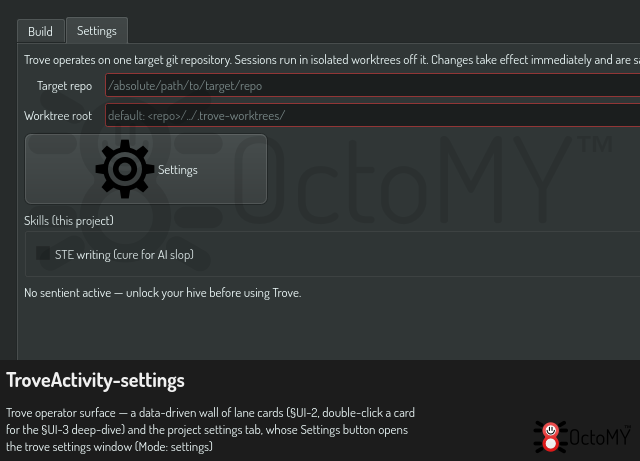
Trove operates on one operator-chosen repository. Point it at yours with the
trove/repoRoot setting (an absolute path to a git checkout):
trove/repoRoot— the target repo. Required; if empty, Trove stays idle and no lanes can be created.trove/worktreeRoot— where lane worktrees live. Optional; defaults to the sibling<repo>/../.trove-worktrees/.
Set both in the Trove app's Settings tab (hub Apps menu → Trove). A change is kept and applies immediately, with no restart.
The policy settings are in the trove settings window. Push Settings on the Settings tab to open it. It has these rows: the spawn stagger (the minimum time between two session starts, for the burst limit of the server; there is deliberately no concurrency limit), unattended resume (default off), the idle-session time to live and the idle check interval, the spec and plan paths, and the models of each role. The verification prompt is in the prompt manager. "Write to" sets a value for all projects or for one project.
Watch and drive from the UI
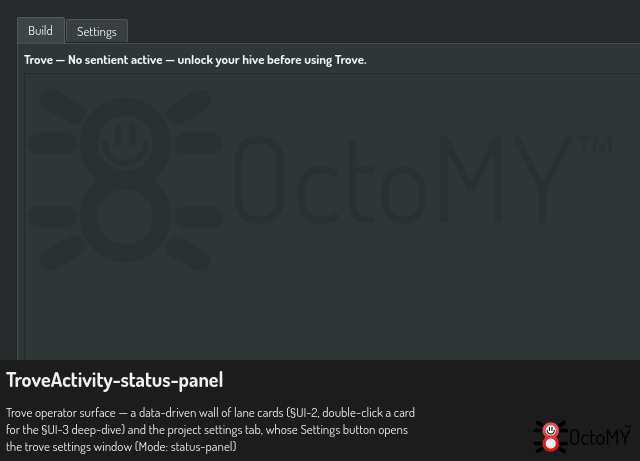
The Trove activity's Status tab is the board: the lanes you have, the plans and jobs with their state, the live-session count, and a New task in lane row that provisions a lane and opens its spec workshop.
Double-clicking a plan opens the deep-dive — a lane view with two faces, toggled with F6 (the face is global, so flicking lanes keeps the same face up):
-
Impl face — the session's transcript stream (assistant output as markdown, tool calls as chips, the orchestration timeline as set-aside cards) beside a live stats panel (model, context tokens with a confidence badge, branch, worktree, cycle step, running time). Under the stream an input row messages a running session mid-task; on a finished session it becomes Continue — which, with a confirmation, starts a fresh autonomous
claude --resumesession.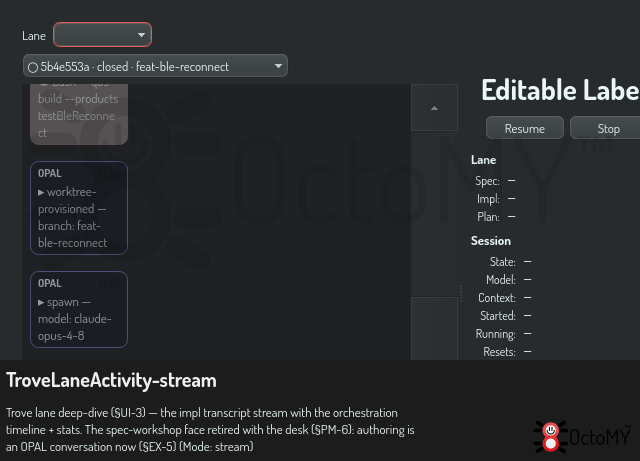
The spec-face workshop that used to sit beside this — a file tree over a per-lane spec worktree, with an editor and its own assistant chat — is retired. Specs are rows in a database now rather than documents in a branch, so there is nothing for a file tree to show. Authoring happens in an OPAL conversation instead; see Create a spec.
Ctrl+PgUp/Ctrl+PgDown (and Ctrl+Home/Ctrl+End) switch sessions/lanes without
the mouse; F1 shows every shortcut. If a session ever needs you to log in again,
Trove raises a login screen with an embedded browser (or your system browser) — the
login is completed by Claude Code, Trove never sees the token, and it returns by
itself the moment the session continues.
Queue and observe work from the CLI
Trove is driven through the trove.* OPAL tasks. Run them against a hub with
hub --opal '<json>':
# Queue a plan document into lane 1's impl cycle (the plan must already exist on
# the lane's spec branch — write it on the spec face, or commit it yourself).
hub --opal 'trove.enqueue lane=1 plan=content/doc/internal/plans/version-flag-plan.md'

# See lanes, plans and jobs.
hub --opal 'trove.status'
hub --opal 'trove.list'

# Sync a lane: rebase its spec onto origin/<default>, then impl onto spec.
hub --opal 'trove.sync lane=1'

# Cancel a job (tears down its live session too).
hub --opal 'trove.cancel jobId=7'

# The morning step: land a lane's integration line — rebase onto the latest origin
# default, merge, and push. Conflicts are surfaced, never auto-resolved.
hub --opal 'trove.finalize branch=lane-1-spec'

# Pick a finished (or crashed, or reaped) session back up where it left off.
# A value containing spaces cannot use the short form: it splits on spaces,
# so `prompt=Now add tests…` would set prompt="Now" and silently DROP the
# rest. Use the plan form when any value has a space in it.
hub --opal '{"steps":[{"task":"trove.continue","args":{
    "sessionId":"72cf8855-acfe-4869-a193-f35e0be4b49a",
    "prompt":"Now add tests for the edge cases"}}]}' -c
trove.enqueue— queue a plan into a lane.lane+plan(repo-relative document path) are required;modeloptional. The lane is created lazily on first use. Spawning autonomous work confirms every call and needs thetrove.spawnscope.trove.status— job counts by status plus the live-session count.trove.list— plans/jobs and the lanes that exist, as JSON.trove.sync— rebase a lane's spec ontoorigin/<default>, then impl onto spec.trove.cancel— cancel a queued job, or stop a running session, by id.trove.finalize— land a lane's spec branch toorigin/<default>and push.trove.switch-model/trove.answer-auth—/modelon, or answer an auth prompt of, a running job's session (Trove never touches the token itself).trove.continue— resume a finished/reaped/pre-restart session in its retained worktree (--resume) with your next prompt. One continuation at a time.
The queue is durable (persisted under the node base dir; a mid-run restart rehydrates outstanding work and resumes the interrupted session). Sessions are durable too: every session's record (lane, branch, worktree, model, timeline) is kept in a session book, which is what continue/crash-recovery resume from.
What Trove does on your behalf
Per session, so an unattended claude can make progress, Trove:
- Runs
claudeinteractively (the human-supervisable, most-defensible posture) with--dangerously-skip-permissionsso it does not block on per-edit prompts, inside the isolated worktree (not your main tree). - Pre-trusts that worktree for
claude(writeshasTrustDialogAcceptedfor the worktree path in~/.claude.json) so the first-run trust dialog does not block startup. Trust is granted only to the lane worktree. - Provisions the worktree's
.claude/settings.jsonwith hooks that report session readiness and completion, and aCLAUDE.mdinstructing that finished work is committed and carries no agent-attribution trailer. These machine files are git-excluded locally, so they never dirty a lane nor land on a pushed branch. - Leaves
ANTHROPIC_API_KEYunset so work runs on the subscription, never pay-per-token, and scrubs Claude-Code session-nesting variables from the child environment so each session presents as a fresh top-levelclaude(a "nested" claude skips writing the transcript Trove's live view and telemetry read).
Because --dangerously-skip-permissions lets the agent edit and run code without
prompting, only point Trove at repositories you own and intend to hand to an
autonomous agent, and keep the conservative unattended/stagger defaults until you
have verified your usage against the live policy.
Current status
Trove's engine is complete and validated end-to-end against a live claude
(spawn → work → completion → durable resume), and the in-app UI covers the lanes
board, the two-face deep-dive (impl stream + spec workshop), intervene, the all-knobs
settings pane and the auth screen. On Android, which cannot spawn a child claude,
only the REST/API driver is available (no terminal sessions).
See also: Trove spec work — the Spec desk, the New-spec triage, and per-role models · Spec lanes vs build lanes · Run tests · Contribute