Rent machines to run the work
Money first. Everything on this page can spend real money, and a rented machine bills by the hour until it is destroyed — whether or not it is doing anything. Three things stand between you and a surprise bill, and you set up all three before you buy anything:
- The spend rail. A maximum hourly rate and a maximum daily spend. Every purchase is checked against both before the provider is called, and a fleet with no rail buys nothing at all.
--yes. Without it,fleet-ctl fleet scaletells you what it would buy and what it would cost, and stops.- The reaper.
fleet-ctl fleet reconcile --reapdestroys machines that carry your fleet's tag and are doing no work. It never touches a machine that is not tagged for your fleet.The first example below sets a rail that admits one small instance.
OctoMY™ rents machines from a cloud provider, boots them into an image you built, and destroys them when the work is done. The machines join as ordinary executors, so jobs reach them the same way they reach any other node. Today the provider is Hetzner Cloud.
What you need
-
A build of
fleet-ctl:qbs build -p fleet-ctlIt lands in
default/install-root/usr/local/bin/. -
A Hetzner Cloud project and an API token for it with read and write access. Keep the token in a file only you can read.
fleet-ctlreads it from standard input, uses it for one command, and stores it nowhere. -
Something for the machines to run. From a hub, nothing more is needed: a machine fetches the hub itself, as a bundle, from the hub that bought it. From
fleet-ctl, an image pushed to an image registry the machines can reach. See Build and move container images. Hetzner runs no image registry of its own. -
A coordinator: the hub the new machines report to, reachable from the provider's network. See Let the machines reach the hub.
Configure the fleet and set the rail
fleet-ctl fleet configure \
  --region fsn1 \
  --os-image debian-12 \
  --coordinator coordinator.example.com:8124 \
  --image registry.example.com/team/executor:v1 \
  --max-hourly 0.02 --max-daily 0.50
This writes the fleet's settings and its rail to fleet-ctl.ini in your
configuration directory, and prints them. --state FILE keeps a fleet
somewhere else, which is how you run two fleets side by side.
Configuring a fleet the first time gives it a tag, which it prints. Every machine this fleet buys carries that tag, set in the same call that creates the machine. The tag is what lets two fleets share one provider account without either one ever destroying the other's machines.
The rail above admits one machine of the smallest kind and stops a runaway at fifty cents a day. Raise it when you mean to.
See what a machine costs
fleet-ctl fleet catalog --token-stdin < ~/.secrets/hetzner-token
The catalog lists every instance type you can buy in your region right now, with its cores, memory, architecture and hourly price. Availability changes by the minute, and a type can be priced in a location and still be sold out there, so read it here rather than from a page like this one.
Buy
Ask first, without --yes:
fleet-ctl fleet scale --type cax11 --count 1 --token-stdin < ~/.secrets/hetzner-token
It prints the type, the rate and the rail, and buys nothing. Then buy:
fleet-ctl fleet scale --type cax11 --count 1 --yes --token-stdin < ~/.secrets/hetzner-token
A purchase the rail does not admit is refused with the limit and the amount that would cross it. Of three machines asked for, the rail may admit one; you get one, and the message says why not the others.
What happens on a purchase, in order:
- The rail is checked.
- The fleet mints an id for the machine and an id for the executor it will run, and writes both to its record — before it calls the provider.
- The machine's first-boot document is built with the executor id in it, and refused if it is larger than the provider accepts.
- The provider is called once, with the tag and the minted id as the machine's name.
If the answer to that call is lost, the fleet asks again with the same name. Hetzner refuses a second machine of the same name, the fleet finds the first one by it, and you own one machine rather than two.
Watch it
On a hub, Apps → Fleet opens the fleet activity: every machine, its state, what it has cost, the work waiting for a machine that does not exist yet, and any machine billing with no executor behind it.
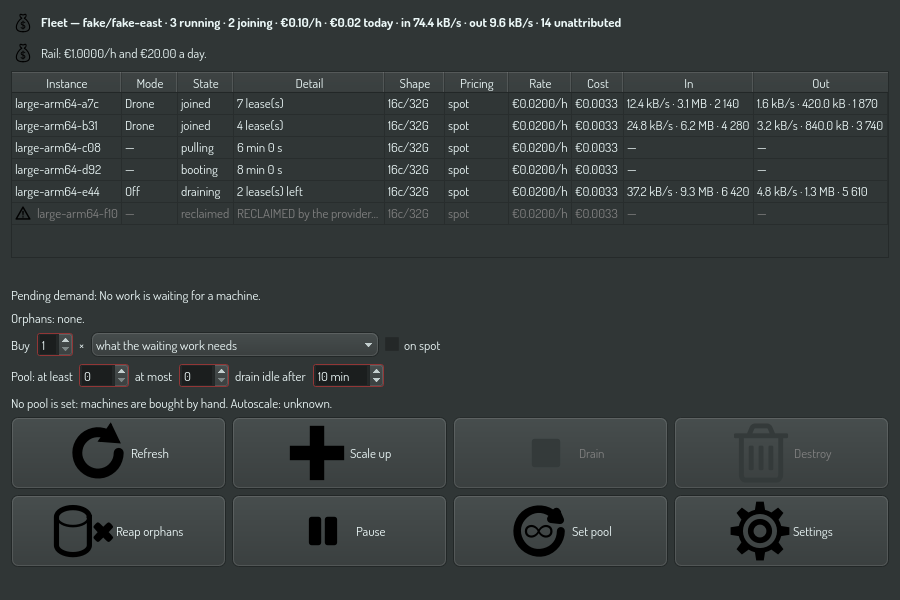
The header carries the hourly rate and today's spend, because those are what you open this screen for. A machine that bills and has not joined after twenty minutes gets a warning, and so does one the provider took back.
The In and Out columns show the traffic between this hub and each
machine that joined, for example 12.4 kB/s · 3.1 MB · 2 140: the bytes per
second over the last five seconds, the bytes, and the datagrams. They update
every second. A machine that has not joined shows —. The header adds the
hub's total rate each way, and the datagrams that named no machine, such as
idle packets. Sort by a column to find the busiest machine.
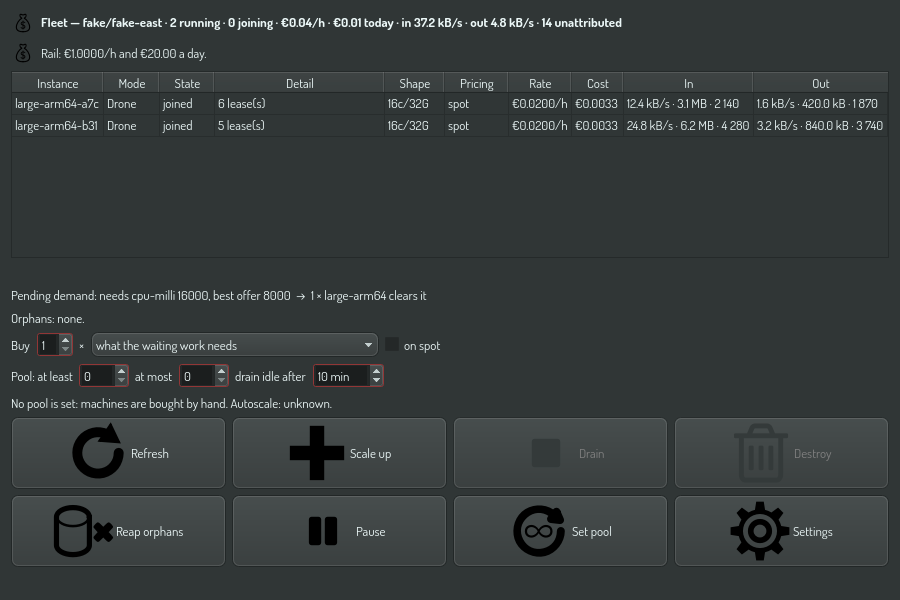
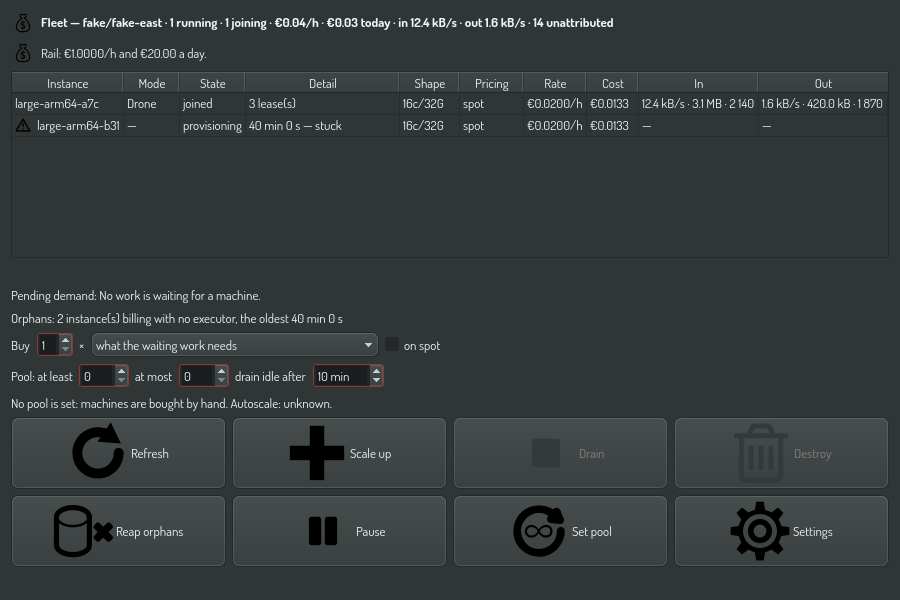
Every button runs the same OPAL task a plan would, through the node's task runtime, so a click meets the same tier and the same permission prompt.
Scale up buys what the row above the buttons names: a count, and either a machine type from the provider's live catalog for your region, cheapest first, or "what the waiting work needs", which lets the scaling strategy choose. Before anything is bought it asks you to confirm, and the question names the type, the region and the price per hour, says that billing runs until the machine is destroyed, and warns you when the spend limits will refuse the purchase. Tick on spot for a cheaper machine the provider can take back at any time; it is offered only for types sold on spot.
The pictures above are drawn from a simulated provider.
Bind a fleet to a hub
A hub rents nothing until you give it a provider token and spend limits.
- Open Setup → Fleet settings, or Settings in the fleet activity.
- Select the provider, and type its API token.
- Type the region, the OS image and the coordinator address. Leave the executor
image empty to have each machine run this hub, fetched from this hub.
Keep the coordinator port at 18426 unless your router forwards another one.
Under Job types, name the job types the machines run, for example
opal:node.probe. - Set the spend limit per hour and per day. A limit of 0 refuses every purchase.
- Select Test. The hub reads the region's catalog with the token and buys nothing.
- Select Save.
The hub seals the token to its own identity before it writes it, so a copy of the settings file does not give the token away. Another node cannot open it, and a hub with a new identity asks you to type it again.
When a token is stored, the screen shows Replace token… in place of the field. Select it and confirm to type a new token. Until you save, the stored token stays in use.
Do not use Forget token to stop spending. It unbinds the fleet, and the machines it rents keep running and keep billing. Destroy them first.
The fleet that fleet-ctl manages lives in its own state file, and the hub
does not read it. Both read the same configuration format.
A hub with no screen takes the same settings from the fleet.configure task.
Only the settings you name change, and the token is kept:
{"task": "fleet.configure", "args": {"region": "fsn1", "osImage": "debian-13",
 "coordinator": "203.0.113.7:18426", "image": "", "jobTypes": "opal-task"}}
Let the machines reach the hub
A rented machine reports to the hub over the internet. Behind a home or office router, the hub has no public address, so the router forwards one port to it.
- Find the hub's address on your network, for example
192.168.1.20. - On the router, forward port 18426, both UDP and TCP, from the public address to that address and port. UDP carries the hub's traffic with the machine. TCP carries the hub bundle the machine fetches at first boot.
- In Fleet settings, set the coordinator to the router's public address and
the forwarded port, for example
203.0.113.7:18426. - Select Save. The hub moves to the coordinator port at once. The status
line says
It listens on UDP port 18426, or why it cannot.
Each machine joins by itself with a one-time token from its bootstrap. You do
not pair it. When it has joined, it shows as Joined in the fleet activity.
Follow it from the command line
fleet-ctl fleet refresh --token-stdin < ~/.secrets/hetzner-token
fleet-ctl fleet list
fleet-ctl fleet cost
refresh asks the provider how each machine is doing and adds the time it
billed to the day's spend. list and cost read the fleet's record and call
nobody, so they need no token.
A machine moves through these states: requested, provisioning, booting, pulling, joined, draining, terminating, gone, and reclaimed when the provider takes it back. It reaches joined when its executor reports to the coordinator, which only a node sees — a command line never does.
Keep track of what it costs
Every fleet-ctl fleet command ends with one usage line, on standard error
and appended to fleet-ctl.ini.usage.log beside the state file:
2026-10-02T18:02:04Z list exit=0 fleet=91a8bed6-7107 provider=hetzner/fsn1 billing=0 rate=0.0000/h today=0.0002 total=0.0002 rail=0.0200/h,0.3000/day EUR
Hetzner's API reports prices and traffic but never a charge, so this count is the fleet's own. It follows Hetzner's billing unit: a machine destroyed after a minute is counted as the hour Hetzner bills for it. The public IPv4 address has a small hourly charge of its own, which this line does not include yet. Your invoice is the final word.
Run a program on the machines
A machine the fleet bought can run a program of yours directly, besides the jobs it takes as a worker. Build it for Linux and the machine's architecture, then start it on the machines you name:
{"task": "fleet.run", "args": {"program": "/home/me/fleet-probe",
  "arguments": ["--exit", "7"], "instances": ["3db86a31-878d-4c52-8c04-e1f0de8f9e25"]}}
The answer names a run set, with one row per machine. Follow it with
fleet.run.status, which shows each run's exit code and the end of its output
once it has finished, and fetch a file a run wrote with fleet.run.collect.
Give count and type in place of instances to buy machines for the set; that
spends money, so it asks every time, and each run starts when its machine is up.
fleet-probe, which the hub ships, is the program to try first: it prints the
machine's CPU count and exits with the code you give it. Its other options make
it crash, hang or write a lot, so you can watch how a run set reports each.
Stop buying
fleet-ctl fleet pause
A paused fleet still says what it would buy and buys nothing. The pause is
saved, so a restart does not lift it. fleet-ctl fleet resume does.
Destroy
fleet-ctl fleet destroy --id 0d6c2f1e-… --token-stdin < ~/.secrets/hetzner-token
The machine goes to terminating, and the next reconcile sees it gone. A
machine that is doing work is refused: drain it from its node first, or pass
--discard, which throws its work away.
Reconcile and reap
fleet-ctl fleet reconcile --token-stdin < ~/.secrets/hetzner-token
Reconcile compares what the provider bills with what the fleet believes, and names every difference:
| Finding | Means | With --reap |
|---|---|---|
| orphan | Carries your tag; the fleet has no record of it. Billing for nobody | Destroyed after the grace period |
| stillborn | Bought, never reported in | Destroyed after the grace period — by a node only, see below |
| vanished | In the record; the provider no longer has it | Marked gone |
| ghost | Its executor still reports; its machine is gone | Named, for the coordinator to forget |
| reclaimed | The provider took it back | Marked reclaimed; its work returns to the queue |
| foreign | Another fleet's tag, or none | Never destroyed, at any age |
--reap destroys only what carries your fleet's tag, and only past the grace
period: 30 minutes for an orphan and 20 for a machine that never reported,
or --grace-minutes N for both. Run it on a timer, and an orphan costs you at
most one grace period.
fleet-ctl never reaps a stillborn machine. Whether a machine reported in
is something only the coordinator knows, and no machine ever reports to a
command line. So from fleet-ctl, every machine past its grace looks
stillborn, including ones busy with work. It names them and leaves them
running. The node that runs the fleet sees its executors, and reaps them
there.
From OPAL
The same operations are OPAL tasks, so a plan, a trigger or the assistant can watch the fleet's money while you sleep:
| Task | Does | Tier |
|---|---|---|
fleet.list |
Every instance, with state, cost and executor id | operational |
fleet.instance |
One instance in full, with every state it passed through | operational |
fleet.cost |
The rate, today's spend, and both against the rail | operational |
fleet.demand |
The work waiting for a machine, and what the strategy would buy | operational |
fleet.reconcile |
Name every difference. Destroys nothing | operational |
fleet.scale |
Buy instances | fleet-spend |
fleet.drain |
Set a node Off, so it finishes its work and takes no more | secured |
fleet.destroy |
Drain, then destroy. Refuses while work is out, and says how much | secured |
fleet.reap |
Destroy orphans and stillborn machines past the grace period | secured |
fleet.pause |
Buy nothing until resumed | secured |
fleet.scale is the only task in its tier: buying a machine starts a charge
that outlives the session, so only the owner may do it, and every call is
confirmed.