Node Lifecycle
Launch, configuration, and activation sequences
Node Lifecycle
How OctoMY™ nodes are launched, configured, and activated.
Pro Tip
Understanding the service level system is key to debugging startup issues. Services are organized into levels (Always, Discovery) that control when they activate. If a service isn't starting, check which level it's registered to.
Overview
While Agents, Remotes, and Hubs serve widely different purposes, there is a large overlap in features under the hood. All node types follow the same lifecycle pattern for initialization.
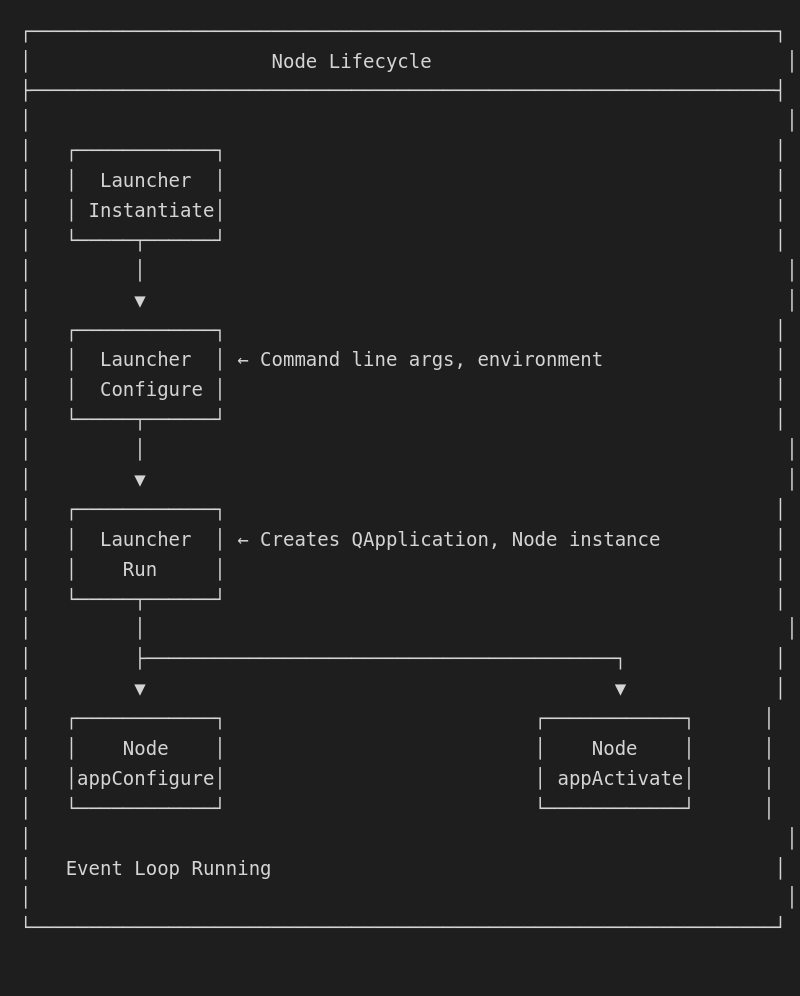
Common node components
All node types share these core components:
Core identity & security
| Component | Description |
|---|---|
| Key Store | Storage for security keys |
| Local ID | The identity of the node |
| Local Network Addresses | Addresses the node can be reached by over the local network |
Communication
| Component | Description |
|---|---|
| Address Book | Clients address book (clients are nodes we communicate with) |
| Client Instances | Each client instance is an on-going communication state with another node |
| Comms Carrier | Underlying transport (UDP/Bluetooth/Ethernet) for comms |
| Comms Channel | Channel used to communicate with other nodes |
Discovery & external services
| Component | Description |
|---|---|
| Discovery Client | Service to automatically discover other nodes |
| Zoo Client | Used to exchange data via the central repository server (Zoo) |
Hardware (Agent-specific)
| Component | Description |
|---|---|
| Sensors | Helper to access all sensors available to the node |
| Sensor Comms Courier | Manages transmission of sensor data changes to friendly nodes |
| Blob Comms Courier | Manages transmission of blobs (images, files, video streams) |
| Cameras List | Manages attached cameras, adapting to connections/disconnections |
State
| Component | Description |
|---|---|
| Node Identity | The full identity of the node |
| Server URL | The URL of the Zoo server |
| Node Activation State | Current state during activation |
Service wrappers
Each major component is wrapped in a service for lifecycle management:
| Service | Wraps |
|---|---|
| KeyStoreService | Key Store |
| LocalIDService | Local ID |
| LocalAddressListService | Local address list |
| AddressBookService | Address Book |
| DiscoveryService | Discovery client |
| CommsCarrierService | Comms carrier |
| CommsService | Comms channel |
Service levels
Services are organized into levels that control when they are active:
| Level | Description |
|---|---|
| ServiceLevelManager | Manager for maintaining lifecycle and interdependencies of services |
| Always | Service Level that is always active as long as node is running |
| Discovery | Service Level active only when node is in discovery mode |
Launch sequence
Step 1: Launcher instantiation
auto agentMain = QSharedPointer<AppLauncher<Agent>>::create();
The launcher is a template class specialized for the node type (Agent, Remote, or Hub).
Step 2: Launcher configuration
agentMain->configure("agent", argc, argv);
This creates a new AppContext containing:
AppCommandLineParser- Parsed command line optionsQProcessEnvironment- System environment from OS- Command line arguments
Step 3: Launcher run
auto ret = agentMain->run();
exit(ret);
The run phase:
- Instantiates
QCoreApplication(headless) orQApplication(GUI) - or detects and defers to existing event loop - Activates the application:
- Instantiates the Node
- Calls
appConfigure()on node with launcher "shared this" - Calls
appActivate()on node - Hooks signals for
nodeActivateChangedandnodeRequestExit - Queues
node->appActivate(true)on event loop
- Initializes executable resources (icons, images, fonts, etc.)
- Executes the event loop if not already started
Node configuration (appConfigure)
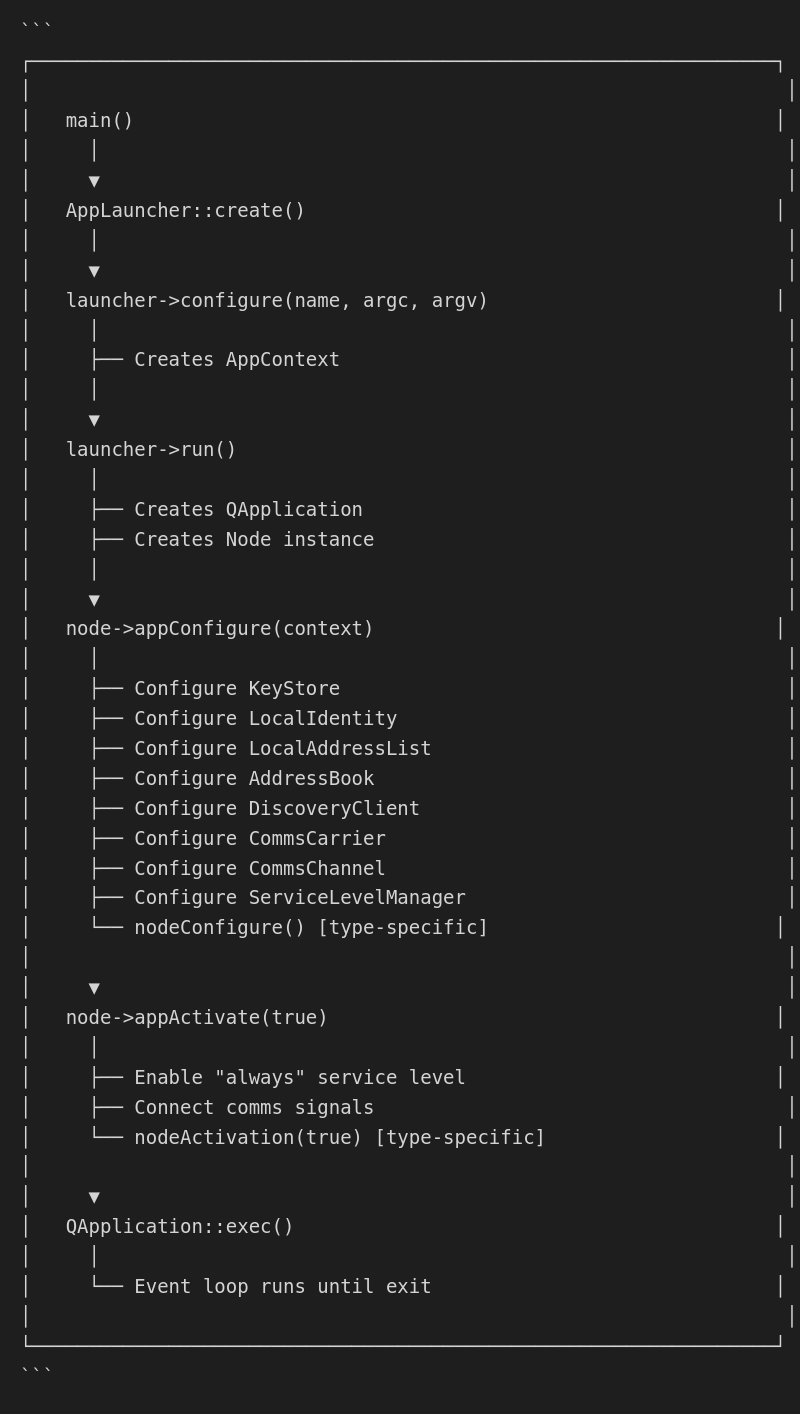
The appConfigure() method initializes all node components in a specific order:
Configuration sequence
void Node::appConfigure(QSharedPointer<AppContext> context) {
    // 1. Apply UI style

    // 2. Configure keystore
    configureKeyStore(baseFolder + "/keystore.json");
    configureKeyStoreService();

    // 3. Configure local identity
    configureLocalIdentity(baseFolder + "/local_identity.json");
    configureLocalIdentityService();

    // 4. Configure local address list
    configureLocalAddressList(defaultPortForNodeType);
    configureLocalAddressListService();

    // 5. Configure address book
    configureAddressBook(baseFolder + "/addressbook.json");
    configureAddressBookService();

    // 6. Configure discovery client
    configureDiscoveryClient(nodeType, timingConfig);
    configureDiscoveryClientService();

    // 7. Configure comms carrier
    configureCommsCarrier();
    configureCommsCarrierService();

    // 8. Configure comms channel
    configureCommsChannel();
    configureCommsChannelService();

    // 9. Configure service level manager
    configureServiceLevelManager();
    registerServices("always");
    registerServices("discovery");

    // 10. Call node-specific configuration
    nodeConfigure();
}
Node-specific configuration (nodeConfigure)
Each node type implements nodeConfigure() for type-specific setup. For example, Agent:
void Agent::nodeConfigure() {
    // Configure agent config store
    configureAgentConfigStore(baseFolder + "/agent_config.json");
}
Node activation (appActivate)
The appActivate() method brings the node online:
void Node::appActivate(bool activate) {
    if (activate) {
        // Enable "always" service level
        serviceActivation("always", true);

        // Hook comms signals
        connectCommsSignals();

        // Call node-specific activation
        nodeActivation(true);
    } else {
        nodeActivation(false);
        serviceActivation("always", false);
    }
}
Node-specific activation (nodeActivation)
Each node type implements nodeActivation(). For Agent:
void Agent::nodeActivation(bool activate) {
    if (activate) {
        // Activate agent config store
        agentConfigStore->activate();

        // Synchronize agent config store
        agentConfigStore->synchronize();
    }
}
Lifecycle diagram
File locations
During configuration, nodes create files in their base folder:
~/.local/share/OctoMY™/OctoMY <NodeType>/<Personality>/
├── keystore.json           # Cryptographic keys
├── local_identity.json     # Node identity
├── addressbook.json        # Known peers
└── <type>_config.json      # Type-specific config (e.g., agent_config.json)